SYMPTOM:
Strategy Server Activation is a licensing technology that ensures that installations of Strategy server products are authentic and have been legitimately licensed. Server Activation registers each Server Installation with Strategy and locks the installation to a specific machine. For more details regarding Strategy Server Activation, refer to the Strategy Licensing Site (https://licensing.Strategy.com).
User activates an installation containing Strategy Intelligence Server (and other Strategy servers) and this activation process is successful. However, the user finds that after the machine is rebooted, the following standard activation warning message is received (upon connectivity through Desktop, Web or License Manager) indicating that the installation has been deactivated:
Strategy's server products require activation within ## calendar days of installation. At least one server product has not yet been activated after installation and/or upgrade. These product(s) will remain functional for another ## days after which they will not restart. Please activate these products using License Manager or visit the activation web site at https://licensing.Strategy.com
The user is able to successfully re-activate the installation, however after the next machine reboot, the same situation is encountered.
CAUSE:
The most likely cause of frequent deactivations (which results in a prompt for re-activation each time) is a change in (or unavailability of) the unique machine identifier information. For a windows machine, the unique machine identifier used for activation is the Network Ethernet Card (NIC) MAC Address.
To troubleshoot the issue and determine the exact cause, the 'MAQueryEnvironment' diagnostic may be enabled as described in the following Knowledge Base techhnical note:
KB19037: What kind of diagnostics are helpful in troubleshooting issues pertaining to frequent deactivations of MicroStrategy servers
When the Strategy Intelligence Server starts-up, it check the validity of the unique machine identifier - it checks the MAC Address of the Network Ethernet Card (on a Windows machine) and compares the value to that of its current activation record. If this information does not match or if it cannot obtain the MAC address, the installation is deactivated.
In many environments, the Strategy Intelligence Server service is set to start automatically upon a machine reboot. This unfortunately may cause a "timing issue" such that Intelligence Server starts up "too soon", but it may not be enough time for the Network Ethernet Card to be "visible" and hence the deactivation occurs.
The 'MAQueryEnvironment' diagnostic can show evidence of the Network Ethernet Card being "not visible". Following is a snippet of this trace showing comparison between two scenarios:
From looking at the snippets above, it is seen that the scenario of Intelligence Server start-up upon machine reboot is missing the following information in the diagnostic:
Found MAC 00:15:c5:ff:a7:49, Hash is 4f80cfb3c47749c
In one reported environment, the active Network Ethernet Card was on standby mode, so it took some time to be "available" after machine reboot.
ACTION:
Set the Strategy Intelligence Server service to not start-up automatically upon a machine reboot. This may be done by changing the 'Startup Type' to 'Manual' in Strategy Service Manager > Options > Service Startup, as shown on the screenshot below:
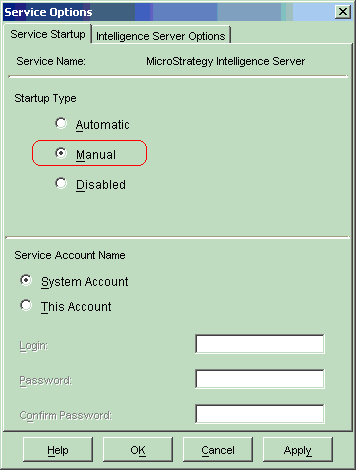
Thereafter, start the Intelligence Server service a few minutes after the machine has completely rebooted giving enough time for the Network Ethernet Card to be "available."
Third Party Software Installation:
WARNING:
The third-party product(s) discussed in this technical note is manufactured by vendors independent of Strategy. Strategy makes no warranty, express, implied or otherwise, regarding this product, including its performance or reliability.
