SYMPTOM
When exporting a report from Strategy Web before version 10.7 and 10.4.4 to any format that will be opened using Microsoft Excel, the report name that appears either in the sheet tab or 'save as' file name section is not rendered correctly.
STEPS TO REPRODUCE:
Follow the steps below to reproduce this issue:
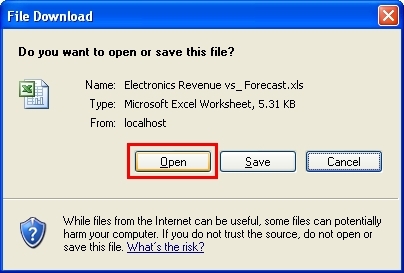
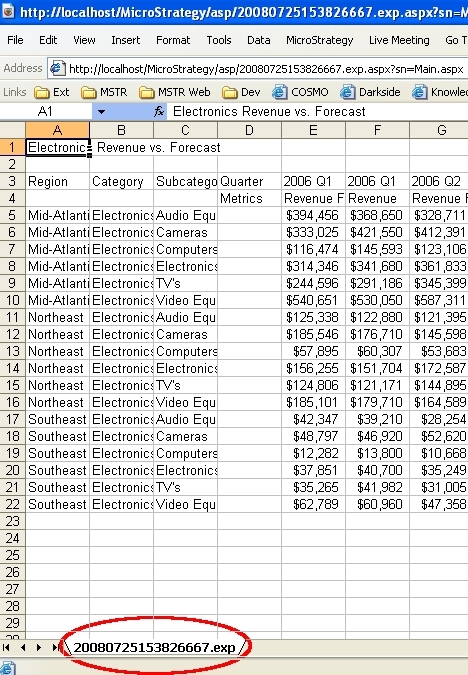
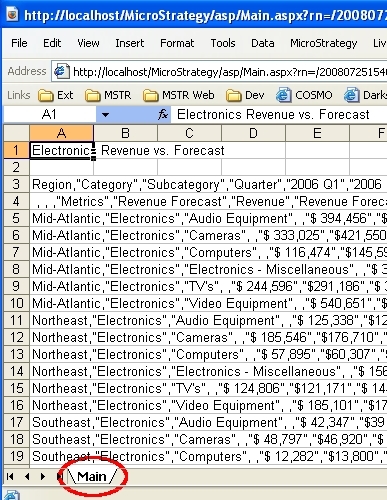
NOTES:
This issue can also occur when exporting to Excel with formatting.
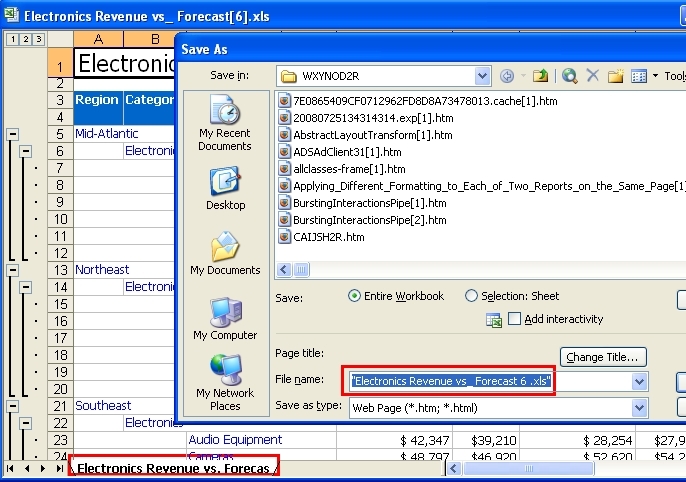
The expected behavior is to have the report name, 'Electronics Revenue vs. Forecast' in this example, populated in the sheet tab and in the Save As dialog window, as shown below:
CAUSE
The reason for the behavior above is because Internet Explorer cannot correctly get the file name from response header. By default, IE uses the last part of the URL as file name. Depending on the size of the report, the last part of the URL is either timestamp (for small report without wait page triggered) or Main.aspx/mstrWeb (for larger report with wait page triggered).
WORKAROUND:
ACTION
Start from Strategy 10.7(for feature release) and 10.4.4(for platform release 10.4.x), Strategy added a new parameter force-download to the response header Strategy Web sends with the Excel file to the client browser so the browser will open the file in a stand alone instance of Microsoft Excel instead being embedded in the browser.
To achieve same result in older version of Strategy Web, perform the following:
1.Modify the exportFormats.xml under \WEB-INF\xml\config folder within the Strategy Web directory using the best practices outlined on the MSDL
2.Within the exportFormats.xml file, add the parameter force-download="true" to the excelPlaintext export format type:
<export-format
name="excelPlaintext" desc="Excel with plaintext" desc-id="mstrWeb.249"
file-extension="xls" mime-type="application/vnd.ms-excel"
style="ReportGridStyleExportExcelPlainText"
bean-type="ReportBean" view-mode="com.Strategy.web.objects.EnumWebReportViewMode.ReportViewModeGrid"
export-format-type="com.Strategy.web.app.beans.EnumExportFormats.ExportFormatExcelWithPlaintext"
page-name="exportBinary"
force-download="true"
3.Make this modification on all the export formats:
4.Save the changes and restart the Web Server.
Customization Code Warning:
This customization is provided as a convenience to Strategy users and is only directly applicable to the version stated. While this code may apply to other releases directly, Strategy Technical Support makes no guarantees that the code provided will apply to any future or previous builds. In the event of a code change in future builds, Strategy may not be able to provide additional code on this matter even though this customization is provided at this time for this specific build.
KB19099
