EducationSoftwareStrategy.com
StrategyCommunity

Knowledge Base

Product

Community

Knowledge Base

TopicsBrowse ArticlesDeveloper Zone

Product

Download SoftwareProduct DocumentationSecurity Hub

Education

Tutorial VideosSolution GalleryEducation courses

Community

GuidelinesGrandmastersEvents
x_social-icon_white.svglinkedin_social-icon_white.svg
Strategy logoCommunity

© Strategy Inc. All Rights Reserved.

LegalTerms of UsePrivacy Policy
  1. Home
  2. Topics

KB19114: 'Error 1068: The dependency service or group failed to start.' error occurs when starting the MicroStrategy Narrowcast Server 9.x - 10.x from the Windows Services manager when the Remote Registry Service is installed on the machine


Community Admin

• Strategy


This article describes a possible cause for the MicroStrategy Narrowcast Server 9.x - 10.x system to fail to start through MicroStrategy Narrowcast Administrator or through Windows Services.

SYMPTOM:
The Strategy Narrowcast Server 9.x - 10.x system fails to start when using Strategy Narrowcast Administrator with the following error:

ka04W000000OheiQAC_0EM440000002BHP.gif


An unexpected error was encountered while attempting to start the Distribution Manager.
Possible causes are 1) the target machine is unreachable, 2) you do not have enough permission on the target machine to access the Distributor Manager Proxy, 3) the Strategy Logging Client is not running on the target machine, or 4) the password of the Distribution Manager Service or the Distribution Manager Proxy identity account is incorrect or expired.
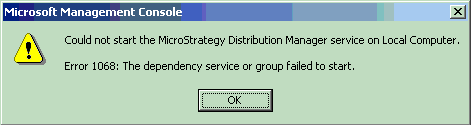
 
 
If the Strategy Distribution Manager service is started from the Windows Services manager, the following error message occurs:

ka04W000000OheiQAC_0EM440000002BHM.gif


Could not start the Strategy Distribution Manager Service on Local Computer.
Error 1068: The dependency service or group failed to start.

 
Additionally, the following error message can be found in the System Log of the Windows Event Viewer:
 

ka04W000000OheiQAC_0EM440000002BHT.gif


The Strategy Distribution Manager service depends on the Remote Registry Service service which failed to start because of the following error:
The service cannot be started, either because it is disabled or because it has no enabled devices associated with it.
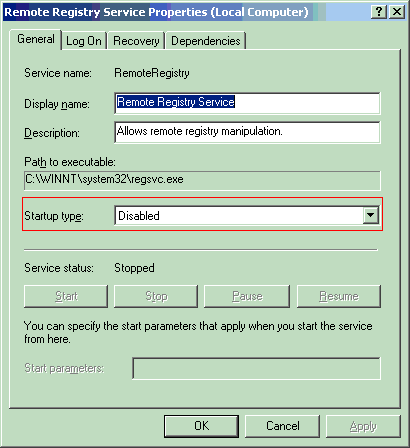
 
 
CAUSE:
The Windows Remote Registry service has either been stopped or disabled.

ka04W000000OheiQAC_0EM440000002BHV.gif

 
ACTION:
To resolve the issue start the Remote Registry service.
 
To ensure that the Remote Registry services starts when the machine is started perform the following steps:
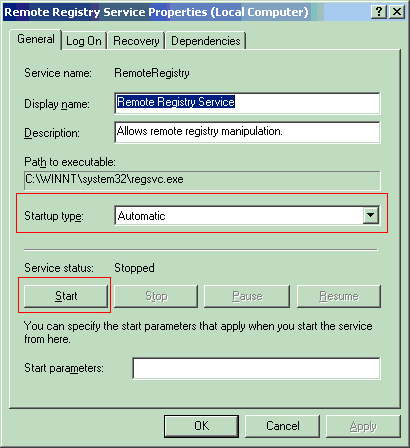
  • From the Windows Services manager, locate the 'Remote Registry' service.
  • Right-click on the service and choose 'Properties'.
  • Under 'Startup type' choose 'Automatic'.
ka04W000000OheiQAC_0EM440000002BHR.gif
  • Click the Apply button.
  • Click the Start button to start the Remote Registry service.

After the Remote Registry service is started, the Strategy Narrowcast Server 9.x - 10.x should be able to start normally.


Comment

0 comments

Details

Knowledge Article

Published:

May 1, 2017

Last Updated:

May 1, 2017