EducationSoftwareStrategy.com
StrategyCommunity

Knowledge Base

Product

Community

Knowledge Base

TopicsBrowse ArticlesDeveloper Zone

Product

Download SoftwareProduct DocumentationSecurity Hub

Education

Tutorial VideosSolution GalleryEducation courses

Community

GuidelinesGrandmastersEvents
x_social-icon_white.svglinkedin_social-icon_white.svg
Strategy logoCommunity

© Strategy Inc. All Rights Reserved.

LegalTerms of UsePrivacy Policy
  1. Home
  2. Topics

KB19162: Transformation is not applied to the transformation metric in the MicroStrategy Engine


Community Admin

• Strategy


This article describes a possible cause for why a transformation is not applied to a transformation metric.

SYMPTOM:
A transformation is not applied to the transformation metric in the Strategy Engine.
 
STEPS TO REPRODUCE:
The following scenario uses Strategy Tutorial Project connected to a Microsoft SQL Server 2000 warehouse:
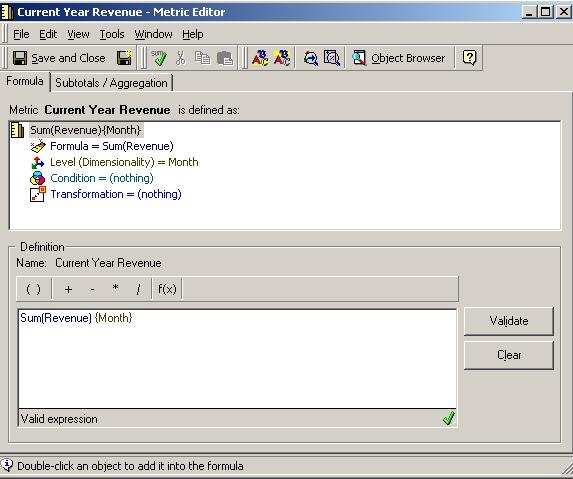
  • In the Strategy Tutorial project, create a metric called 'Current Year Revenue' at month level as seen below:
ka04W000000Og0dQAC_0EM440000002UqW.jpeg
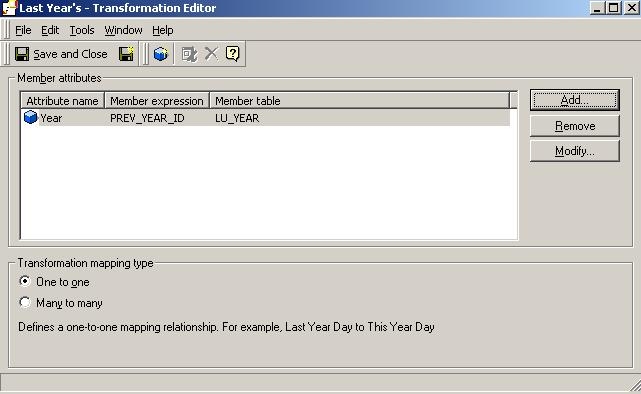
  • Create a transformation called 'Last Year's' as defined below:
ka04W000000Og0dQAC_0EM440000002UqU.jpeg
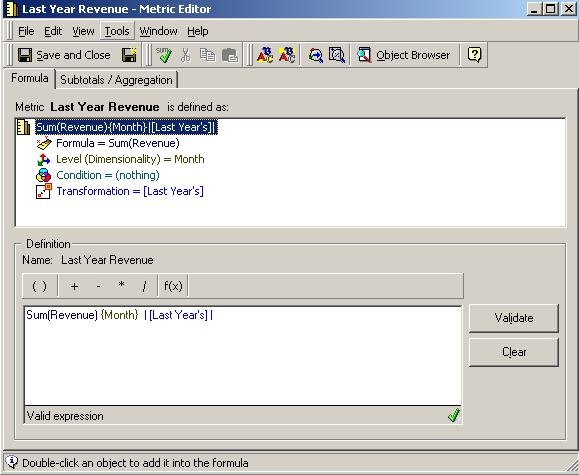
  • Now create a transformation metric called 'Last Year Revenue' at month level (apply Last Year transformation created in Step 2 ):
ka04W000000Og0dQAC_0EM440000002Uqe.jpeg
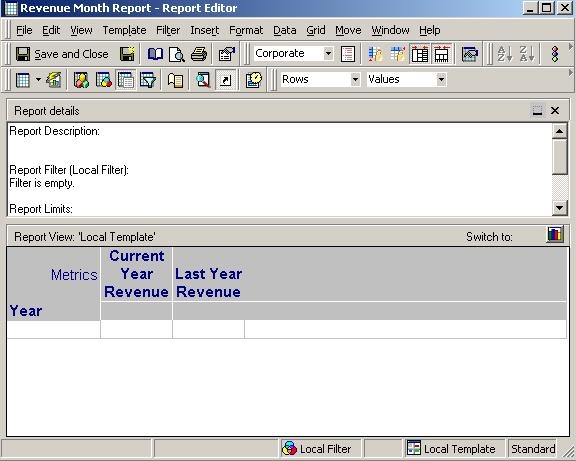
  • Now create a report with attribute Year in the row and the above two metrics on the column as seen below:
ka04W000000Og0dQAC_0EM440000002UqY.jpeg
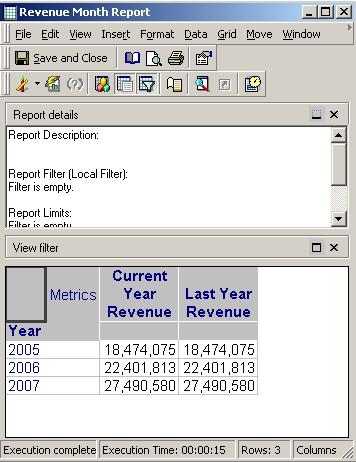
  • The result of the above report looks like this. Notice how the transformation did not apply as the results of both the metrics are the same.
ka04W000000Og0dQAC_0EM440000002Uqc.jpeg
  • View the SQL of the above report and notice in Pass 2 that the Last Year transformation created in Step 2 did not apply.
    
    Pass0 - Duration: 0:00:00.14
    select a12.YEAR_ID YEAR_ID,
    sum(a11.TOT_DOLLAR_SALES) WJXBFS1
    into #ZZTPF02008SMD000
    from MNTH_CATEGORY_SLS a11
    join LU_MONTH a12
    on (a11.MONTH_ID = a12.MONTH_ID)
    group by a12.YEAR_ID
    
    Pass1 - Duration: 0:00:00.12
    select a12.YEAR_ID YEAR_ID,
    sum(a11.TOT_DOLLAR_SALES) WJXBFS1
    into #ZZTPF0200B5MD001
    from MNTH_CATEGORY_SLS a11
    join LU_MONTH a12
    on (a11.MONTH_ID = a12.MONTH_ID)
    group by a12.YEAR_ID
    
    Pass2 - Duration: 0:00:00.15
    select coalesce(pa11.YEAR_ID, pa12.YEAR_ID) YEAR_ID,
    pa11.WJXBFS1 WJXBFS1,
    pa12.WJXBFS1 WJXBFS2
    from #ZZTPF02008SMD000 pa11
    full outer join #ZZTPF02008SMD001 pa12
    on (pa11.YEAR_ID = pa12.YEAR_ID)
    
    Pass3 - Duration: 0:00:00.21
    drop table #ZZTPF02008SMD000
    
    Pass4 - Duration: 0:00:00.06
    drop table #ZZTPF02008SMD001

Note: If the transformation had applied Pass 1 would look like this:


Pass1 - Duration: 0:00:00.10
select a12.YEAR_ID YEAR_ID,
sum(a11.TOT_DOLLAR_SALES) WJXBFS1
into #ZZTPF02008SMD001
from MNTH_CATEGORY_SLS a11
join LU_MONTH a12
on (a11.MONTH_ID = a12.LY_MONTH_ID)
group by a12.YEAR_ID

 
CAUSE:
This is working as designed. Before applying a transformation to a metric, the SQL Engine performs 2 steps:

  1. Calculate the analytical key
    Analytical key is a group of attributes calculated by first gathering the attributes from the template, metrics' definition, filter definition, etc, then reducing the group of these attributes by only selecting the lowest level attribute of each hierarchy. SQL Engine then uses this information to find the best warehouse tables to join together to get the desired result.
    In the above example, the analytical key contains the group of attributes - Year and Month but since Month is the lowest level in the Time hierarchy, the final analytical key contains Month only.
  2. List the transformation base attributes
    In this example, the transformation base attribute is Year.
     

Now after the above two steps are performed, in order for the transformation to apply, at least one of the transformation base attributes should be in the analytical key. Since Year is not in the analytical key, the transformation does not apply in the above scenario.
 
ACTION:
Edit the transformation to include Month level data as seen below:
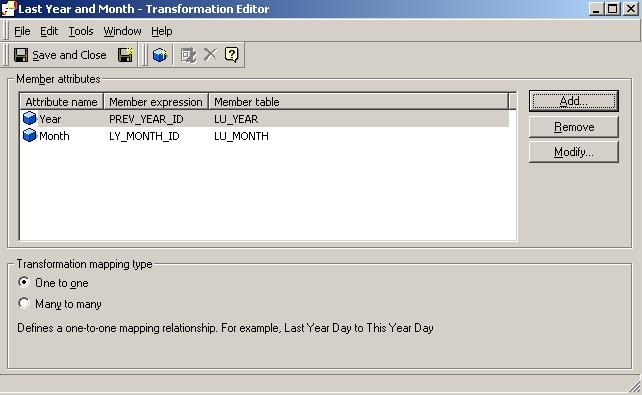
ka04W000000Og0dQAC_0EM440000002Uqi.jpeg

 
Now the transformation base attributes are Year and Month. Since Month is in the analytical key, the transformation gets applied to the metric as seen below:
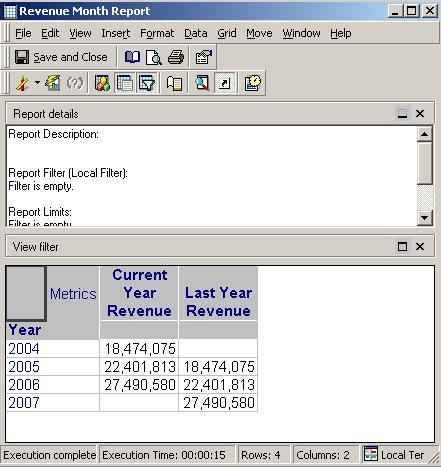
ka04W000000Og0dQAC_0EM440000002Uqg.jpeg


Comment

0 comments

Details

Knowledge Article

Published:

July 14, 2017

Last Updated:

July 14, 2017