EducationSoftwareStrategy.com
StrategyCommunity

Knowledge Base

Product

Community

Knowledge Base

TopicsBrowse ArticlesDeveloper Zone

Product

Download SoftwareProduct DocumentationSecurity Hub

Education

Tutorial VideosSolution GalleryEducation courses

Community

GuidelinesGrandmastersEvents
x_social-icon_white.svglinkedin_social-icon_white.svg
Strategy logoCommunity

© Strategy Inc. All Rights Reserved.

LegalTerms of UsePrivacy Policy
  1. Home
  2. Topics

KB19182: In MicroStrategy Intelligence Server, report job statistics are not logged in the IS_REPORT_STATS table for non-prompted report executions from MicroStrategy Desktop that hit cache.


Community Admin

• Strategy


In MicroStrategy Intelligence Server, report job statistics are not logged in the IS_REPORT_STATS table for non-prompted report executions from MicroStrategy Desktop that hit cache.

SUMMARY:
In Strategy Intelligence Server, report job statistics are not logged in the IS_REPORT_STATS table for non-prompted report executions from Strategy Desktop that hit cache.
When a non-prompted report execution from Strategy Desktop hits a valid report cache (not executed against the warehouse), there are no statistics recorded in the IS_REPORT_STATS table for this report execution. An entry for the cache hit is recorded in the IS_CACHE_HIT_STATS table.
It is noted that Statistics are logged in the IS_REPORT_STATS table for non-prompted report executions from Web that use report caches and for prompted report executions (that hit cache) from Desktop.
STEPS TO REPRODUCE:

  • Consider the following non-prompted report containing just the attribute 'Region' and metric 'Revenue'.
ka04W000000OehTQAS_0EM440000002BGz.jpeg
  • Execute the report on Desktop and observe that a report cache gets created for this report.
  • Run the following query against the IS_REPORT_STATS table to get statistics data for the report job from Step 2 (include the appropriate WHERE clause to get the correct data).
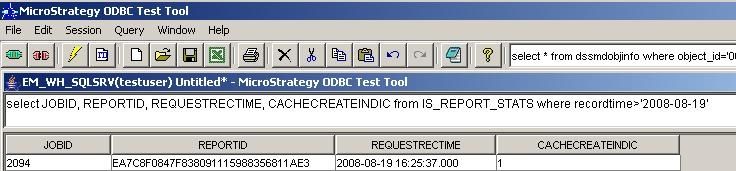
    select JOBID, REPORTID, REQUESTRECTIME, CACHECREATEINDIC from IS_REPORT_STATS where recordtime>'2008-08-19'
  • From the results of the above query, note that the CACHECREATEINDIC column value for this job is 1, indicating that this job created a report cache.
ka04W000000OehTQAS_0EM440000002BGi.jpeg
  • Re-execute the same report and observe that the report cache is used this time, instead of executing against the warehouse.
  • Run the query from Step 3 again to get information about the report job from Step 5.
  • It is observed that there is no entry in the IS_REPORT_STATS table for this report execution that used cache.
  • Querying the IS_CACHE_HIT_STATS table shows the cache hit corresponding to the report execution from step 5.
  • As noted in the results shown below, the CACHECREATORJOBID matches the Job ID of the report execution from Step 2.
ka04W000000OehTQAS_0EM440000002BGh.jpeg
  • For a non-prompted report job execution from Strategy Web, a new job ID is seen in the IS_REPORT_STATS table. The CACHECREATEINDIC column is correctly seen as 0 representing a cache hit.
ka04W000000OehTQAS_0EM440000002BGx.jpeg

CAUSE:
Statistics logging is working as designed. A new Job is not created when a non-prompted report execution from Strategy Desktop uses a valid report cache. A new Job is created only for Web executions. This difference is because of the varied workflow for Strategy Desktop and Web.
ACTION:
There is no action that needs to be taken as the behavior is by design.


Comment

0 comments

Details

Knowledge Article

Published:

June 7, 2017

Last Updated:

June 7, 2017