SYMPTOM:
When a report is exported from Strategy Web as the .csv file format and opened in Excel, users will notice that the first object column is not surrounded by quotes the way all subsequent object columns are. This can cause concern if these .csv files are to be used in conjunction with scripts that look for quotations around objects.
STEPS TO REPRODUCE:
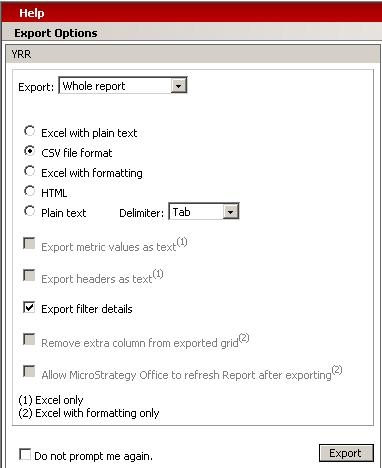
Use the following steps to reproduce this behavior in Strategy Web based on the Strategy Tutorial project:
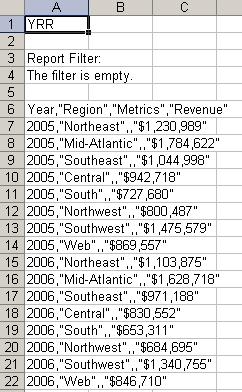
CAUSE:
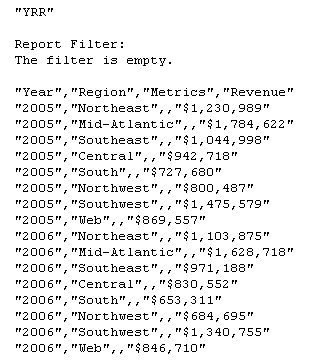
This behavior is inherent to Microsoft Excel. Strategy passes the quotes as can be seen when the file is opened using Wordpad, but Microsoft Excel removes the first set of quotes when loading the .csv file. This can further be illustrated if another attribute is added to the left of Year.
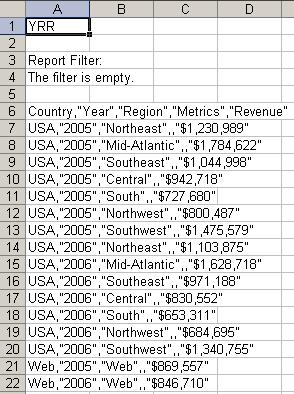
Notice that now Year and all of its elements are surrounded by quotes, but the newly added Country attribute and all of its elements do not reflect the quotes.
ACTION:
If .csv files are to be passed to other applications using scripts, have the files passed using a text editor such as Notepad or Wordpad.
