EducationSoftwareStrategy.com
StrategyCommunity

Knowledge Base

Product

Community

Knowledge Base

TopicsBrowse ArticlesDeveloper Zone

Product

Download SoftwareProduct DocumentationSecurity Hub

Education

Tutorial VideosSolution GalleryEducation courses

Community

GuidelinesGrandmastersEvents
x_social-icon_white.svglinkedin_social-icon_white.svg
Strategy logoCommunity

© Strategy Inc. All Rights Reserved.

LegalTerms of UsePrivacy Policy
  1. Home
  2. Topics

KB19313: After adding or removing CPUs to a machine the MicroStrategy Service Manager 9.x does not correctly adjust the 'Number of Licensed Processors' setting


Community Admin

• Strategy


This Knowledge Base document explains why after adding or removing CPUs to a machine the MicroStrategy Service Manager 9.x does not correctly adjust the 'Number of Licensed Processors' setting

SYMPTOM:
The Strategy Service Manager 9.x does not reflect the correct number of licensed processors after new processors have been added or some were removed.
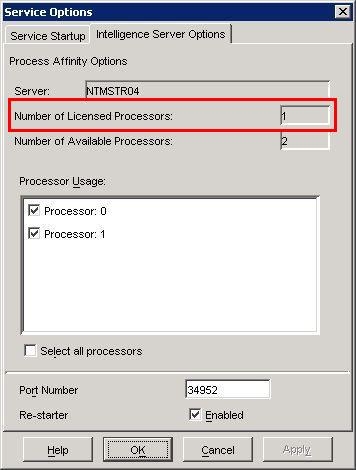
For example, consider a machine with 1 CPU which is using a license key allowing 2 CPUs. The Strategy Intelligence Server 9.x was configured and setup with the single CPU. At a later time a new CPU was added to the machine to take advantage of the second licensed CPU. However, the Strategy Service Manager 9.x only shows a single licensed processor as below:
ka04W000000OfVyQAK_0EM440000002BGo.jpeg

NOTE: The Strategy Service Manager 9.x does reflect that there are two available processors.
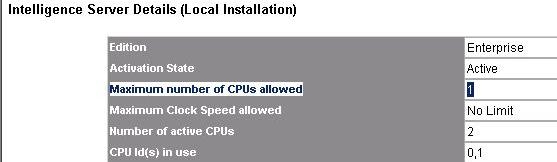
Running an Audit Report on the machine shows that the Strategy Intelligence Server 9.x is only licensed for 1 CPU:
ka04W000000OfVyQAK_0EM440000002BGp.jpeg

 
Checking the License Key confirms that the correct number of CPUs is coded into the key. For example:

2 Intelligence Server Enterprise MHz-Rated CPU no limit

 
CAUSE:
The 'Number of Licensed Processors' field in the Strategy Service Manager 9.x is dependent upon the number of CPUs deployed at the time that the installation was activated.
Anytime that the hardware of a machine which has a Strategy 9.x server product installed changes the installation needs to be re-activated.
 
ACTION:
Re-activate the installation on the machine.


Comment

0 comments

Details

Knowledge Article

Published:

March 31, 2017

Last Updated:

March 31, 2017