EducationSoftwareStrategy.com
StrategyCommunity

Knowledge Base

Product

Community

Knowledge Base

TopicsBrowse ArticlesDeveloper Zone

Product

Download SoftwareProduct DocumentationSecurity Hub

Education

Tutorial VideosSolution GalleryEducation courses

Community

GuidelinesGrandmastersEvents
x_social-icon_white.svglinkedin_social-icon_white.svg
Strategy logoCommunity

© Strategy Inc. All Rights Reserved.

LegalTerms of UsePrivacy Policy
  1. Home
  2. Topics

KB19329: Derived metrics show blank cells in MicroStrategy


Stefan Zepeda

Salesforce Solutions Architect • Strategy


This article notes a scenario where derived metrics show blank values instead of the expected result

SYMPTOM:
A derived metric shows blank or null values in a report in Strategy, as shown below:
CAUSE:
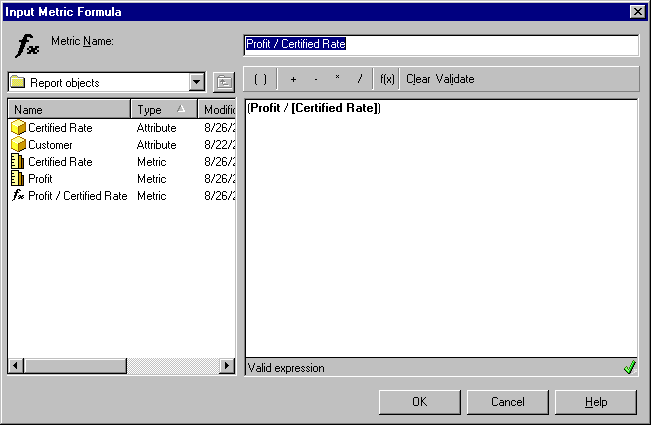
Verify the formula for the derived metric and check the metric definition for each metric in the formula. One of the metrics is based on a text field instead of numeric, as shown below:
 

ka04W000001IwKWQA0_0EM440000002V8r.jpeg

One of the metrics used in the derived metric formula is based on an attribute, as shown below:
 

ka04W000001IwKWQA0_0EM440000002V8t.jpeg

The attribute is textual instead of numeric, as shown below:
 

ka04W000001IwKWQA0_0EM440000002V8u.jpeg

ACTION:
Calculation should be done only on metrics based from a numeric source. Modify the attribute from which the metric is based or base it on a numeric field. To do this, follow the steps below:
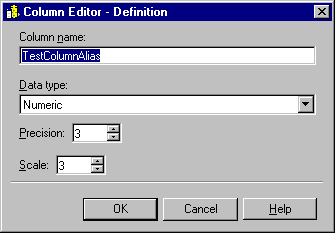
 

  • Apply a numeric column alias to the attribute form, as shown below:
ka04W000001IwKWQA0_0EM440000002V8v.jpeg
  • Change the table column being used to a numeric one for the attribute form.
  • Modify the column in the warehouse to contain numeric values and update the warehouse catalogue and update the attribute definition to reflect the change.

Comment

0 comments

Details

Knowledge Article

Published:

July 18, 2017

Last Updated:

August 24, 2022