EducationSoftwareStrategy.com
StrategyCommunity

Knowledge Base

Product

Community

Knowledge Base

TopicsBrowse ArticlesDeveloper Zone

Product

Download SoftwareProduct DocumentationSecurity Hub

Education

Tutorial VideosSolution GalleryEducation courses

Community

GuidelinesGrandmastersEvents
x_social-icon_white.svglinkedin_social-icon_white.svg
Strategy logoCommunity

© Strategy Inc. All Rights Reserved.

LegalTerms of UsePrivacy Policy
  1. Home
  2. Topics

KB19332: How to create a custom subtotal for a metric based on the values of a compound level metric included in the report in MicroStrategy Developer 9.x - 10.x


Stefan Zepeda

Salesforce Solutions Architect • Strategy


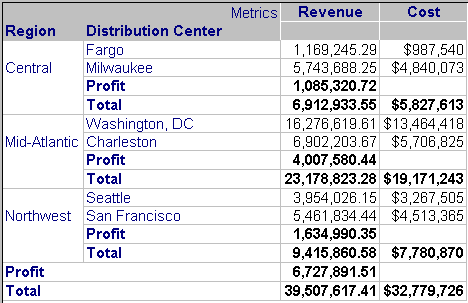
In Strategy Developer 9.x - 10.x, users can define a custom subtotal for a metric that returns a value that a compound level metric would return. For example, given a report with Revenue and Cost, the custom subtotal will return total Profit, as shown below:
 

ka02R000000kWLJQA2_0EM440000002V8p.jpeg

To create a custom subtotal for a metric based on the values of a compound level metric, follow the steps below:
 

  • Create a subtotal based that is the difference between Revenue and the Cost metric, as shown below:
ka02R000000kWLJQA2_0EM440000002V8z.jpeg
  • Note: The metric using the subtotal is represented by the X. Only metrics can be used in the subtotal definition
     
  • Add the subtotal to the Available subtotals for metric in the Metric editor, as shown below:
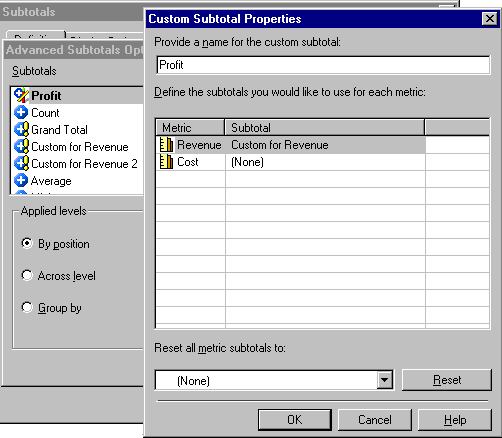
  • Create a custom subtotal in the report editor and base it on the Custom for Revenue Subtotal for the revenue metric, as shown below:
ka02R000000kWLJQA2_0EM440000002V8l.jpeg
  • Select this new Example Subtotal created above, as shown below:
ka02R000000kWLJQA2_0EM440000002V8x.jpeg

The report will show the subtotal as shown in the first image.


Comment

0 comments

Details

Knowledge Article

Published:

July 18, 2017

Last Updated:

July 18, 2017