EducationSoftwareStrategy.com
StrategyCommunity

Knowledge Base

Product

Community

Knowledge Base

TopicsBrowse ArticlesDeveloper Zone

Product

Download SoftwareProduct DocumentationSecurity Hub

Education

Tutorial VideosSolution GalleryEducation courses

Community

GuidelinesGrandmastersEvents
x_social-icon_white.svglinkedin_social-icon_white.svg
Strategy logoCommunity

© Strategy Inc. All Rights Reserved.

LegalTerms of UsePrivacy Policy
  1. Home
  2. Topics

KB19385: How to perform package creation and binding manually for the MicroStrategy ODBC Driver for DB2 Wire Protocol


Community Admin

• Strategy


The Strategy ODBC driver for DB2 Wire Protocol driver does the package creation and binding automatically. Refer to the following Knowledge Base technical note for more information on this:
 

  • KB19382 (KB1100-000-0659) - Information regarding package creation and binding for the Strategy ODBC Driver for DB2 Wire Protocol

If the values in a data source change after the packages have been created, the user can re-create the packages manually with the new values. This document outlines the procedure for manually creating packages and binding them for this driver.
 
Strategy ODBC Driver for DB2 Wire Protocol on Windows
 
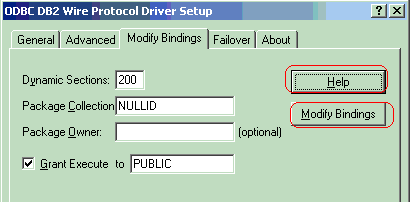
This driver allows package creation and binding from the 'Modify Bindings' tab as shown on the screenshot below:
 

ka04W00000148KsQAI_0EM440000002HVc.gif

 
Users can click on the 'Help' button and check out information in Step #4 under "Configuring Data Sources" for more details about this 'Modify Bindings' tab. The User ID must have appropriate privileges on the database for the driver to create and bind packages. These privileges are BINDADD for binding packages and GRANT for executing the packages. Make sure the 'Grant Execute to Public' box is checked so that any other user can access these created packages.
 
Upon clicking the 'Modify Bindings' button, the user will be prompted for a user name and password. Thereafter, the packages should be successfully created and bound.
 
Strategy ODBC Driver for DB2 Wire Protocol on Unix (Linux, AIX, Solaris, HP-UX)
 
Manual package creation and binding is done through a utility called bind## that is shipped with the product. 
Follow the steps below to perform manual package creation and binding on Solaris, Linux and HP-UX operating systems:


  1. The User ID must have appropriate privileges on the database for the driver to create and bind packages. These privileges are BINDADD for binding packages and GRANT for executing the packages.
     
  2. Ensure that the following parameters are set for the DSN in the odbc.ini file, so that any other user can access these created packages:
    GrantAuthid=PUBLIC
    GrantExecute=1
  3. Run the following command from the console:
    export LD_LIBRARY_PATH <HOME_PATH>/install/lib
  4. where <HOME_PATH> is the directory specified as the Home Directory during installation.
     
  5. Run the following command:
    export ODBCINI <HOME_PATH>/odbc.ini
  6. where <HOME_PATH> is the directory specified as the Home Directory during installation.
     
  7. Run the following from the <HOME_PATH>/install/lib folder:
    bind64 DSN
  8. where DSN stands for the Data Source Name. The user will be prompted for a user name and password. Thereafter, the packages should be successfully created and the following message will be returned:
     
    Packages created and bound.

 
Third Party Software Installation:
WARNING:
The third-party product(s) discussed in this technical note is manufactured by vendors independent of Strategy. Strategy makes no warranty, express, implied or otherwise, regarding this product, including its performance or reliability.


Comment

0 comments

Details

Knowledge Article

Published:

April 26, 2017

Last Updated:

June 17, 2021