EducationSoftwareStrategy.com
StrategyCommunity

Knowledge Base

Product

Community

Knowledge Base

TopicsBrowse ArticlesDeveloper Zone

Product

Download SoftwareProduct DocumentationSecurity Hub

Education

Tutorial VideosSolution GalleryEducation courses

Community

GuidelinesGrandmastersEvents
x_social-icon_white.svglinkedin_social-icon_white.svg
Strategy logoCommunity

© Strategy Inc. All Rights Reserved.

LegalTerms of UsePrivacy Policy
  1. Home
  2. Topics

KB19418: No errors are reported when any e-mail service runs however no emails are delivered in MicroStrategy Narrowcast Server


Community Admin

• Strategy


All services configured to deliver e-mails appear to be running correctly but the e-mails are not delivered in MicroStrategy Narrowcast Server.

SYMPTOM:
All services configured to deliver e-mails appear to be running correctly but the e-mails are not delivered in Strategy Narrowcast Server.
 
Neither the DELog files, nor the System Message Viewer, report any errors. However, an e-mail sent manually as per the following Strategy Knowledge Base technical note is received successfully:

  • KB11482 - How to deliver an e-mail manually for SMTP troubleshooting purposes?

 
CAUSE:
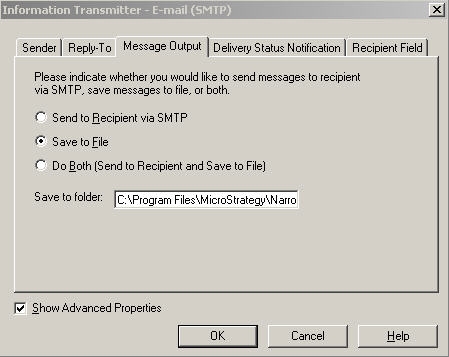
One possible cause for this behavior affecting all e-mail services using the same Information Transmission Module (ITM) is that the 'Message Output' for the ITM has been set to 'Save to File' only.
 
By default only the out of the box 'E-mail (SMTP)' ITM is available for e-mail services. Additional ITMs can be created and they should be checked in the same manner. To check the default 'E-mail (SMTP)' ITM perform the following steps:
  • Open the Narrowcast Administration console and navigate to Administration --> Information Transmitters.
  • Edit the 'E-mail (SMTP)' ITM.
  • Make sure the Show Advanced Properties checkbox is checked, and go to the 'Message Output' tab.
  • Check if it has been configured to only 'Save to File' as follows:
ka04W000000OdKpQAK_0EM440000002BFU.jpeg

 
ACTION:
Change the 'Message Output' to either 'Send to Recipient via SMTP' or 'Do Both (Send to Recipient and Save to File)'. The first option will only send the e-mail but will not save a copy to a file in the 'Save to folder' path, the latter with send the email and save the file.


Comment

0 comments

Details

Knowledge Article

Published:

June 22, 2017

Last Updated:

June 22, 2017