EducationSoftwareStrategy.com
StrategyCommunity

Knowledge Base

Product

Community

Knowledge Base

TopicsBrowse ArticlesDeveloper Zone

Product

Download SoftwareProduct DocumentationSecurity Hub

Education

Tutorial VideosSolution GalleryEducation courses

Community

GuidelinesGrandmastersEvents
x_social-icon_white.svglinkedin_social-icon_white.svg
Strategy logoCommunity

© Strategy Inc. All Rights Reserved.

LegalTerms of UsePrivacy Policy
  1. Home
  2. Topics

KB19424: What information is saved in the EM_PROPS table in the Enterprise Manager Warehouse?


Community Admin

• Strategy


What information is saved in the EM_PROPS table in the Enterprise Manager Warehouse?

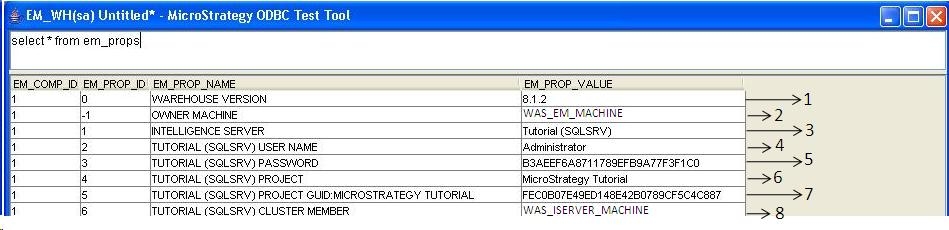
The table EM_PROPS gets created in the Enterprise Manager warehouse during the process of initialization. This table is updated as project sources/projects are configured for dataload and is used by the Enterprise Manager console when performing the dataload.
 

ka04W000000OhMtQAK_0EM440000002BFx.jpeg

 
Labels 1-8 marked in the above image are explained below:
 

  1. The version of Enterprise Manager Warehouse tables. For Enterprise Manager 8.0.0 - 8.1.1, the version of the warehouse is seen as 8.0.1. For Enterprise Manager 8.1.2, the version of the warehouse is seen as 8.1.2.
     
  2. The name of the machine performing the Enterprise Manager Dataload. Only one machine can control the dataload to a particular Enterprise Manager warehouse. If a different machine is selected to perform the dataload, user is informed that the new machine will be the new owner of the Enterprise Manager Dataload process.
     
  3. The name(s) of the 3-tier project sources selected for dataload. All the project sources configured for Dataload are saved in this table.
     
  4. The username of the user used to connect to the Strategy Intelligence Server during dataload. This is the username that is provided when a user is prompted to enter a userID and password after selecting a particular 3-tier project source for dataload configuration.
     
  5. Encrypted form of the above user's password.
     
  6. The name(s) of the projects which are configured for dataload. If the name of a project is updated in the metadata, this change is not propagated to this table. The project name only gets updated if the user reconfigures this project for dataload.
     
  7. The GUID(s) of the projects selected for dataload.
     
  8. The name(s) of the Intelligence Servers being monitored. If it's a cluster, all the members of the Intelligence Server cluster are listed here.

Comment

0 comments

Details

Knowledge Article

Published:

May 24, 2017

Last Updated:

May 24, 2017