EducationSoftwareStrategy.com
StrategyCommunity

Knowledge Base

Product

Community

Knowledge Base

TopicsBrowse ArticlesDeveloper Zone

Product

Download SoftwareProduct DocumentationSecurity Hub

Education

Tutorial VideosSolution GalleryEducation courses

Community

GuidelinesGrandmastersEvents
x_social-icon_white.svglinkedin_social-icon_white.svg
Strategy logoCommunity

© Strategy Inc. All Rights Reserved.

LegalTerms of UsePrivacy Policy
  1. Home
  2. Topics

KB19453: A grid that acts as a selector of another grid in a Report Services Document does not target itself when exported in MicroStrategy Web 8.1.x.


Community Admin

• Strategy


This article explains why a grid that acts as a selector of another grid in a Report Services Document does not target itself when exported in MicroStrategy Web 10.x.

SYMPTOM
Users create a Report Services Document with one grid acting as the selector for another grid. Then, users try to export the document and expect to have everything filtered on the selected item at the resulting exported file, including the contents of the grid acting as the selector. However, the parent grid acting as a selector is exported entirely without being filtered. This behaviour has been noticed in Strategy Web and is shown in the image below.
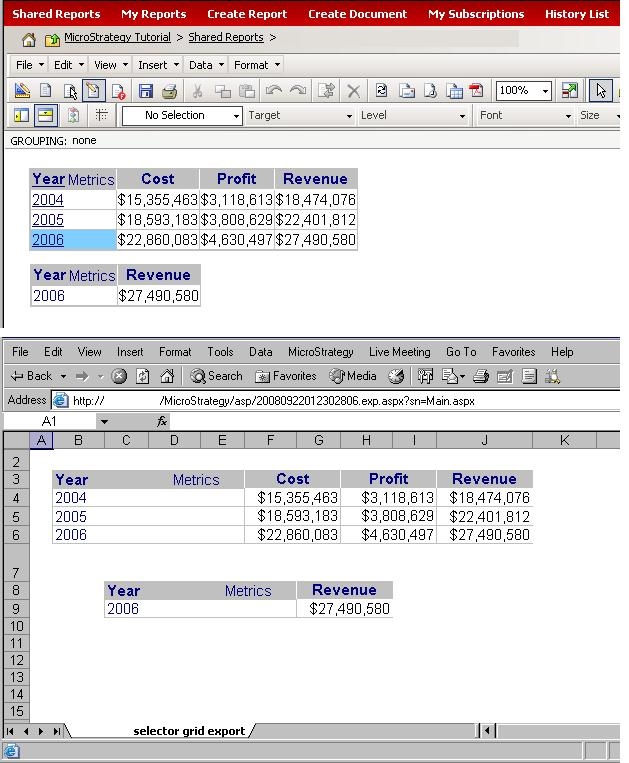
 

ka04W000000OgXWQA0_0EM4400000028Vo.jpeg

 
STEPS TO REPRODUCE
Follow these steps to reproduce the issue.

  1. Create a report with Year, Cost, and Profit.
  2. Add the report to a Report Services Document.
  3. Place the report in the Document Header twice.
  4. On the second instance of the report, remove the Cost metric to differentiate it from the other one.
  5. Right click on the original grid's Year attribute and choose Edit Selector.
  6. Add the modified grid as a target and enable the option to Show option for All.
  7. Run the document.
  8. Use the original grid to drive the modified grid.
  9. Export the document to Excel.
  10. Notice how the original grid is not filtered.

CAUSE
This is working as designed. When a grid is acting as a selector it, does not target itself.
WORKAROUND
Insert a panel stack and place both grids inside it. Target the panel stack instead and enable the option to 'Allow selector to be updated by other selectors' like shown in the image below.
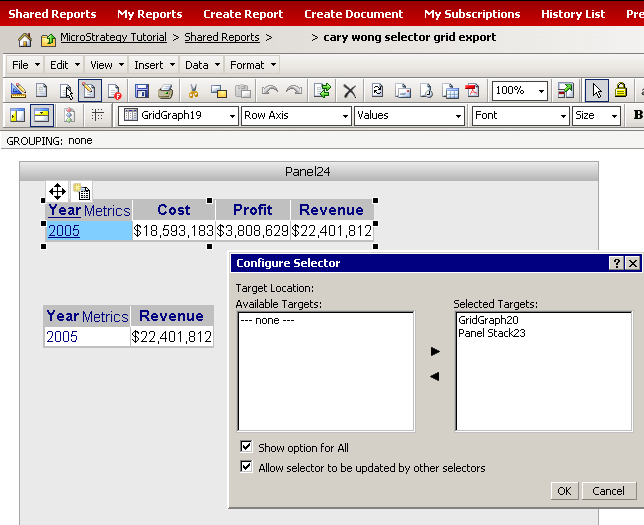
 

ka04W000000OgXWQA0_0EM4400000028Vm.jpeg


Comment

0 comments

Details

Knowledge Article

Published:

June 14, 2017

Last Updated:

June 14, 2017