EducationSoftwareStrategy.com
StrategyCommunity

Knowledge Base

Product

Community

Knowledge Base

TopicsBrowse ArticlesDeveloper Zone

Product

Download SoftwareProduct DocumentationSecurity Hub

Education

Tutorial VideosSolution GalleryEducation courses

Community

GuidelinesGrandmastersEvents
x_social-icon_white.svglinkedin_social-icon_white.svg
Strategy logoCommunity

© Strategy Inc. All Rights Reserved.

LegalTerms of UsePrivacy Policy
  1. Home
  2. Topics

KB19481: Why are there duplicate columns in the "Column Editor-Column Selection" and why can some be deleted while some can’t? -- MicroStrategy Developer 9.x


Stefan Zepeda

Salesforce Solutions Architect • Strategy


Why are there duplicate columns in the "Column Editor-Column Selection" and why can some be deleted while some can’t? -- MicroStrategy Developer 9.x

SYMPTOM:
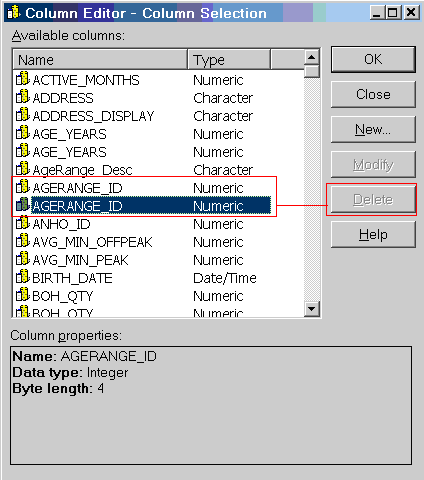
In the 'Column editor - Column Selection' menu, there are several columns that are duplicated. Furthermore, the Delete button is enabled for some columns and not for others. The following screenshot demonstrates this:
 
Enabled:

ka02R000000kX0ZQAU_0EM440000002Eg8.jpeg

Disabled:

ka02R000000kX0ZQAU_0EM440000002Eg4.jpeg

CAUSE:

  • The columns appear twice because there are two Strategy Column objects (different GUID) that reference the same physical column. This can be confirmed by going to the Columns folder under System Objects:
     
ka02R000000kX0ZQAU_0EM440000002Efu.jpeg
  •  
    NOTE: The System Objects folder is hidden by default. In order to make it visible, follow the steps in the Tech Note below:
     
    •  
      KB5700-8X-3351 -- How to display hidden folders/objects in Strategy Desktop 8.x
       
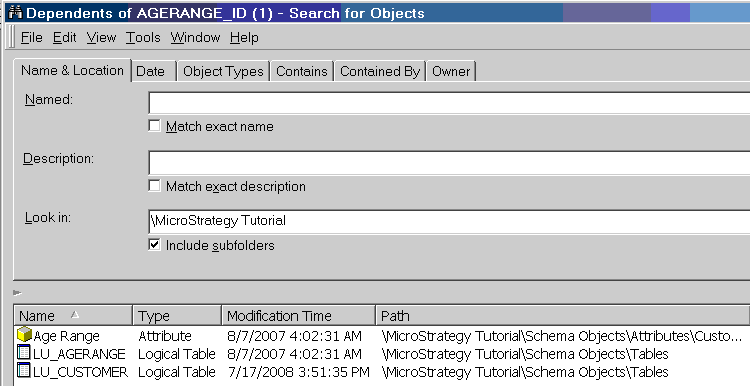
  • The reason the option to Delete one column is available for one column and not for the other is because one has dependents and the other doesn't. A simple dependency search on both columns will confirm this:
     
    AGERANGE_ID (1)
ka02R000000kX0ZQAU_0EM440000002Efv.jpeg
  •  
    AGERANGE_ID
ka02R000000kX0ZQAU_0EM440000002Eg3.jpeg

ACTION:
If this condition is posing a problem then contact Strategy Technical Support to solve the duplicate columns issue.


Comment

0 comments

Details

Knowledge Article

Published:

April 12, 2017

Last Updated:

April 12, 2017