SYMPTOM:
A user executes a report with the following conditions in Strategy Desktop 8.x:
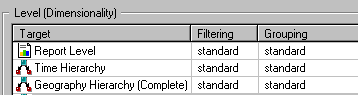


Incorrect results are returned. When checking the SQL of the report, users notice that the report filter is being applied to the calculation of the metric, as shown below:

Users may notice that using a one-to-many relationship for this attribute removes the report filter successfully.
CAUSE:
This is working by design. In this example, the Location Group attribute filter is removed when using the 1:M relationship because of the metric 'Remove related report filter elements` option. Since there are Geography hierarchy attribute filters in the metric conditionality, Strategy determines that the Location Group filter can be safely be ignored.
In the M:M relationship, both attribute's IDs are considered independent keys. Since the Location Group ID is an independent key, Strategy determines that it might no be safe to remove the filter conditions, and applies all the filters to the metric calculation.
WORKAROUND:
If users want to force Strategy to ignore this filter in the metric calculation, two possible workaround might be followed:
