EducationSoftwareStrategy.com
StrategyCommunity

Knowledge Base

Product

Community

Knowledge Base

TopicsBrowse ArticlesDeveloper Zone

Product

Download SoftwareProduct DocumentationSecurity Hub

Education

Tutorial VideosSolution GalleryEducation courses

Community

GuidelinesGrandmastersEvents
x_social-icon_white.svglinkedin_social-icon_white.svg
Strategy logoCommunity

© Strategy Inc. All Rights Reserved.

LegalTerms of UsePrivacy Policy
  1. Home
  2. Topics

KB19503: A row-by-row insert into temporary tables is performed instead of a bulk dataset insert when executing a report again a Sybase IQ warehouse in MicroStrategy 9.4.x and 10.x


Community Admin

• Strategy


When executing a MicroStrategy 9.4.x and 10.x report, with a rank condition in the Report Limit, against a Sybase IQ warehouse database, a row-by-row insert is performed into the temporary tables. The expected behavior is that the entire dataset, in bulk, is inserted into the temporary tables. As a result of each row from the dataset being inserted by a separate SQL statement the report execution slows down.

SYMPTOM:
When executing a Strategy 9.4.x and 10.x report, with a rank condition in the Report Limit, against a Sybase IQ warehouse database, a row-by-row insert is performed into the temporary tables. The expected behavior is that the entire dataset, in bulk, is inserted into the temporary tables. As a result of each row from the dataset being inserted by a separate SQL statement the report execution slows down.
 

ka04W000000OhXwQAK_0EM440000002Ekl.jpeg

Each row of the dataset being inserted by a separate SQL statement.
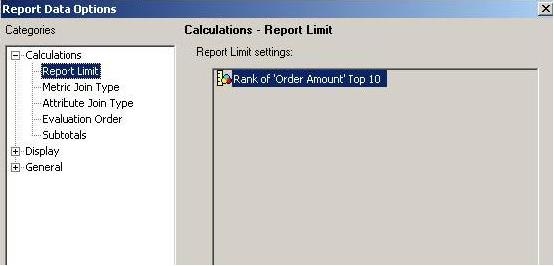
ka04W000000OhXwQAK_0EM440000002Ekm.jpeg

Rank condition in Report Limit section
 
Note: If the filtering condition is moved from the Report Limit to the Report Filter the entire insert is correctly performed as a single bulk statement and the execution time performs as expected.
 
CAUSE:
One cause for this issue is that the database type/version, specified under the 'Database connection type', for the warehouse Database Instance is incorrectly set. The type of database specified dictates the logic of the SQL engine and how it interacts with the various objects and VLDB properties in the report. Choosing an incorrect database connection type can result in unexpected behavior.
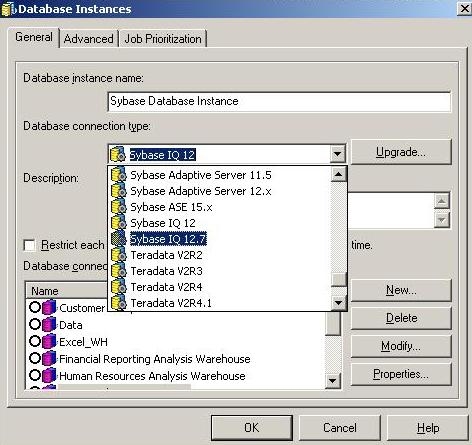
 

ka04W000000OhXwQAK_0EM440000002Ekq.jpeg

ACTION:
Set the correct database type and version in the warehouse database instance object.


Comment

0 comments

Details

Knowledge Article

Published:

May 16, 2017

Last Updated:

May 16, 2017