EducationSoftwareStrategy.com
StrategyCommunity

Knowledge Base

Product

Community

Knowledge Base

TopicsBrowse ArticlesDeveloper Zone

Product

Download SoftwareProduct DocumentationSecurity Hub

Education

Tutorial VideosSolution GalleryEducation courses

Community

GuidelinesGrandmastersEvents
x_social-icon_white.svglinkedin_social-icon_white.svg
Strategy logoCommunity

© Strategy Inc. All Rights Reserved.

LegalTerms of UsePrivacy Policy
  1. Home
  2. Topics

KB19536: When checking the Show Error Bar option in MicroStrategy Developer for a Vertical Bar Graph using a report that contains more than one metric only the first metric appears.


Stefan Zepeda

Salesforce Solutions Architect • Strategy


When checking the Show Error Bar option in MicroStrategy Developer for a Vertical Bar Graph using a report that contains more than one metric only the first metric appears.

SYMPTOM:
When checking the Show Error Bar option in Strategy Developer for a Vertical Bar Graph using a report that contains more than one metric, all the metrics disappears, but the very first one.
STEPS TO REPRODUCE:
Using Strategy Tutorial:
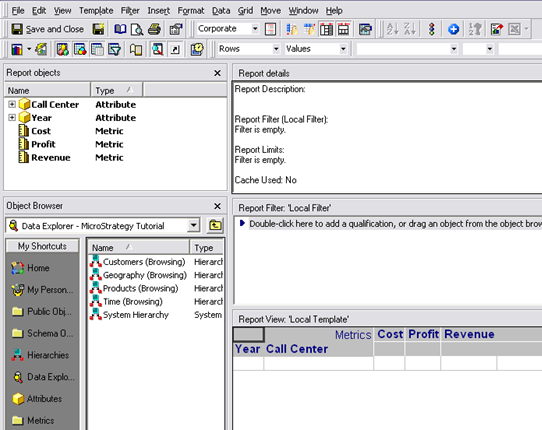
  • Create a new report in Strategy Developer with the following objects, as shown in the image below:
    • Attributes: Year and Call Center
    • Metrics: Cost, Profit and Revenue
ka02R000000kXGQQA2_0EM440000002EiX.jpeg
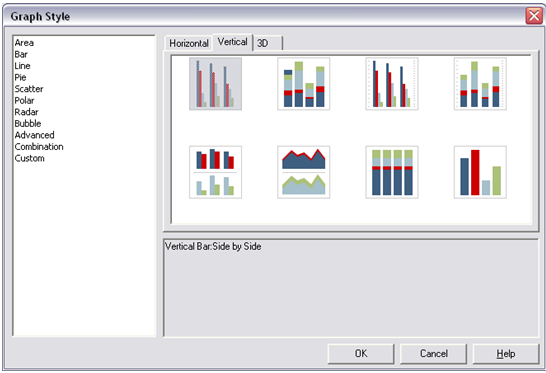
  • Run the report in Graph View and select the Vertical Bar:Side by Side as a Graph Style as shown in the image below:
ka02R000000kXGQQA2_0EM440000002EiV.jpeg
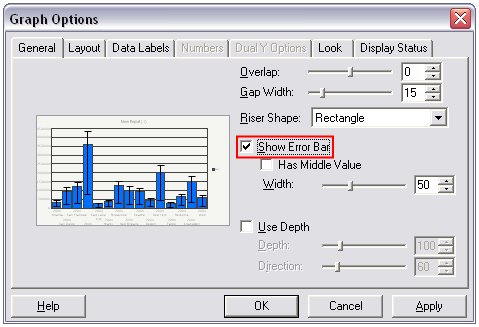
  • After the graphic is displayed, go to Graph Options -> General tab and check the "Show Error Bar" box as shown below:
ka02R000000kXGQQA2_0EM440000002EiH.jpeg
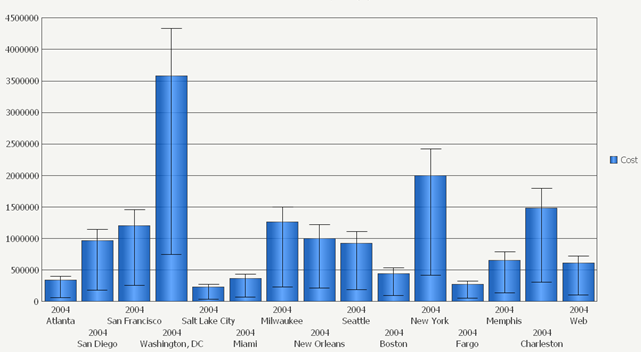
  • Click OK and notice how the "Cost" metric is the only metric displayed on the graph view. Profit and Revenue are lost as shown below.
ka02R000000kXGQQA2_0EM440000002EiJ.jpeg
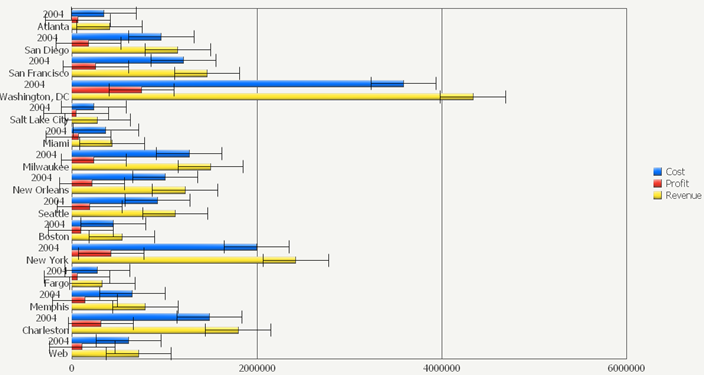
  • Note: If user switches the graph style to "Horizontal Bars", then all metric are displayed correctly as shown in the image below:
ka02R000000kXGQQA2_0EM440000002Eia.jpeg

CAUSE:
This is a known issue in Strategy Developer


Comment

0 comments

Details

Knowledge Article

Published:

June 19, 2017

Last Updated:

June 19, 2017