SYMPTOM:
When running a report in Strategy Developer 9.4.x-10.x and collecting statistics for this execution, the IS_REP_COL_STATS table is not being populated.
STEPS TO REPRODUCE:
Using Strategy Tutorial:
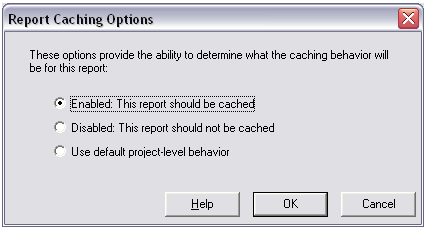
CAUSE:
This is expected behavior for Strategy Statistics logging.
When running a report that is already cached, Strategy will create a record in the IS_CACHE_HIT_STATS table but will not do it for the IS_REP_COL_STATS as shown in the following example SQL being executed:
0090CD1010090CD30insert into IS_CACHE_HIT_STATS (CACHEINDEX,CACHESESSIONID,SERVERID,SERVERMACHINE,PROJECTID,CACHEHITTIME,CACHEHITTYPE,CACHECREATORJOBID,CREATORSESSIONID,JOBID,RECORDTIME) values (13, 'F2CD551E4442F8CC10F9B5A022760C0F', '38A341254D1D43951064E4ABC315BC6A', 'WAS-RORTEGA:34952', 'BB8A57CE45D4CB21F7BA4A86804EF023', {ts'2008-11-11 18:27:17'}, 0, 518, 'F2CD551E4442F8CC10F9B5A022760C0F', -1,GETDATE())
ACTION:
Users have two different options to always have statistics logged the IS_REP_COL_STATS table for running any report :
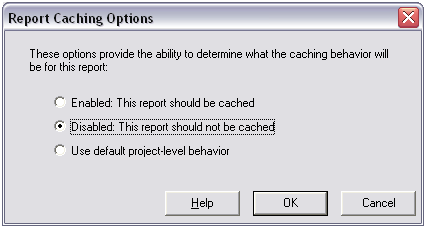
Note: For the second option, users should be aware that disabling the cache option may impact performance for the report will never utilize Intelligence Server caching.
The SQL being executed for statistics will now insert data into the IS_REP_COL_STATS table as shown in the following example query:
0090CD1010090CD30insert into IS_REP_COL_STATS (JOBID,SESSIONID,SERVERID,SERVERMACHINE,PROJECTID,TABLEID,COLUMNID,COLUMNNAME,SQLCLAUSETYPEID,COUNTER,RECORDTIME) values (529, 'F2CD551E4442F8CC10F9B5A022760C0F', '38A341254D1D43951064E4ABC315BC6A', 'WAS-RORTEGA:34952', 'BB8A57CE45D4CB21F7BA4A86804EF023', '8D67912D11D3E4981000E787EC6DE8A4', '8D6792A011D3E4981000E787EC6DE8A4', 'TOT_DOLLAR_SALES', 4, 1,GETDATE())
0090CD1010090CD30insert into IS_REP_COL_STATS (JOBID,SESSIONID,SERVERID,SERVERMACHINE,PROJECTID,TABLEID,COLUMNID,COLUMNNAME,SQLCLAUSETYPEID,COUNTER,RECORDTIME) values (529, 'F2CD551E4442F8CC10F9B5A022760C0F', '38A341254D1D43951064E4ABC315BC6A', 'WAS-RORTEGA:34952', 'BB8A57CE45D4CB21F7BA4A86804EF023', '8D67912D11D3E4981000E787EC6DE8A4', '8D6791E111D3E4981000E787EC6DE8A4', 'YEAR_ID', 2, 1,GETDATE())
