Note: Some of the information mentioned in this knowledge base article applies to the Windows Active Directory configuration and the operating system configuration which may require domain administrator privileges. Users should contact their system administrators for assistance.
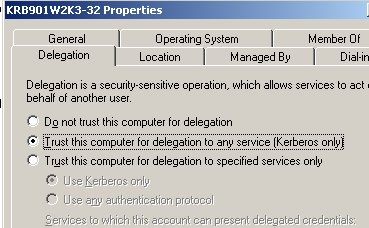
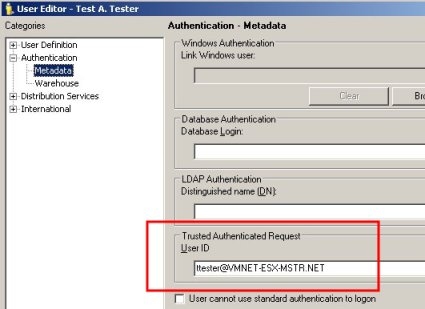
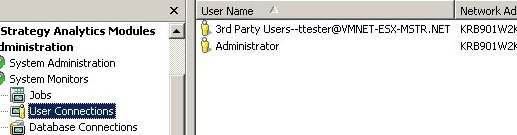
This article explains the steps users in a Microsoft Windows Active Directory environment must do to use Kerberos (Integrated) authentication to authenticate against the Strategy Intelligence Server. There are two parts to this configuration:
>setspn.exe -L mstrsvr_acct
Registered ServicePrincipalNames for CN=Strategy Server Account,CN=Users,DC=vmnet-esx-mstr,DC=net:

>setspn.exe -A MSTRSVRSvc/KRB901W2K3-32:34952 mstrsvr_acct
Registering ServicePrincipalNames for CN=Strategy Server Account,CN=Users,DC=vmnet-esx-mstr,DC=net
MSTRSVRSvc/KRB901W2K3-32:34952
Updated object

>setspn.exe -L mstrsvr_acct
Registered ServicePrincipalNames for CN=Strategy Server Account,CN=Users,DC=vmnet-esx-mstr,DC=net: MSTRSVRSvc/KRB901W2K3-32:34952
>setspn.exe -L KRB901W2K3-32
Registered ServicePrincipalNames for CN=KRB901W2K3-32,CN=Computers,DC=vmnet-esx-mstr,DC=net:

>setspn.exe -A MSTRSVRSvc/KRB901W2K3-32:34952 KRB901W2K3-32
Registering ServicePrincipalNames for CN=KRB901W2K3-32,CN=Computers,DC=vmnet-esx-mstr,DC=net
MSTRSVRSvc/KRB901W2K3-32:34952
Updated object

>setspn.exe -L KRB901W2K3-32
Registered ServicePrincipalNames for CN=KRB901W2K3-32,CN=Computers,DC=vmnet-esx-mstr,DC=net:
MSTRSVRSvc/KRB901W2K3-32:34952
19580
