Introduction:
An element browse request is a request for the elements of an attribute in a project's data model. This request is satisfied by issuing a SELECT statement against the attribute's lookup table. Element requests may also contain a WHERE clause if the element request comes from a search, a filtered hierarchy prompt, a drill request on a hierarchy prompt or a user with a security filter assigned.
When a report prompts on the elements of an attribute, an element browse request is generated by Strategy Intelligence Server in order to fill the prompt with elements from the warehouse. A majority of element requests come from the execution of attribute element prompts.
In order to help speed element requests, Strategy Intelligence Server caches elements retrieved from the warehouse in memory on a per project basis as an element cache. Element caching allows for rapid retrieval of elements without having to query the warehouse for these elements. In addition to element caching on the Intelligence Server, Strategy Desktop also includes the capability to cache elements locally in a similar manner when running in two and three - tier mode.
The features and configuration options related to element browsing and caching provided in the Strategy Intelligence Server are described below:
Maximum RAM usage setting to govern the number of elements that can be cached:
The Strategy Intelligence Server and Strategy Desktop offer the capability to set a maximum value for the number of elements that may be cached. The governing setting is exposed as a project configuration, and two caches exist when running in three - tier mode, one on the client side and the other on the Intelligence Server.
It is important to note that while the governing setting appears to restrict the amount of memory used for caching elements, the actual governing is at the number of elements cached by assuming that each element in a cache would use about 0.5 KB of memory.
Incremental element fetch for element browsing and caching:
For attributes with a large number of elements, retrieving all the elements from the warehouse as well as storing them in the cache is an inefficient strategy, especially when only a fraction of those elements are to be displayed to the user. The Strategy Intelligence Server therefore retrieves elements from the warehouse incrementally in response to the user requests. The setting that governs the number of elements that are retrieved at a time is the "Maximum number of elements to display" setting that can be found in the Strategy Project Configuration under the advanced options section. This setting applies only to the prompts run through Strategy Desktop
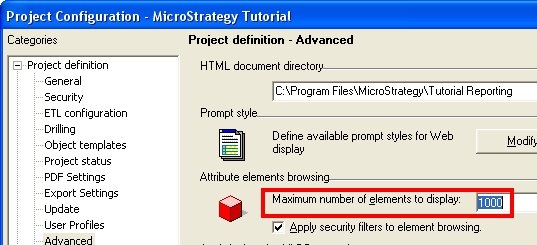
The Incremental fetch settings that apply to prompts executed from a Strategy Web environment - "Maximum number of attribute elements per block" appear in the Project Defaults -> General preferences in Strategy Web as shown below:

If the "Maximum number of elements to display" governor on an attribute is set to N, then Strategy Intelligence Server will retrieve all elements from the database but only hold 4*N elements in memory. The Intelligence Server does this by ordering the results obtained from the database and breaking the result set into batches and retrieving only the elements from the required batch which are then stored in the cache. If the client requests elements that are outside of this batch of elements currently in memory (or cached), then Strategy Intelligence Server will select the entire result set from the warehouse again, but only retrieve the elements for the batch required.
To optimize the incremental element caching feature, a maximum of 10 percent of the element cache size will be used to cache the elements of any one element request. For example, if the element cache size was set such that a maximum of 3000 elements can be cached, then only 300 elements of any element request will be held in cache. In the above example with 500 elements in the attribute and "Maximum number of elements to display" set to 50, 4*50 or 200 elements will be fetched at once. When the next fetch of 200 elements occurs, a total of 400 elements would have been fetched. However, only the last 300 elements would remain in cache. This limit keeps the incremental element fetch paradigm while preventing any one-element request from kicking out from the element cache the incrementally fetched elements of other attributes.
Project level ability to apply security filters to element browsing:
In the Strategy Intelligence Server users can set the Project Configuration advanced options setting called "Apply Security filters to element browsing" to allow or disallow element browse requests to ignore security filters. This setting is shown in the screenshot below:
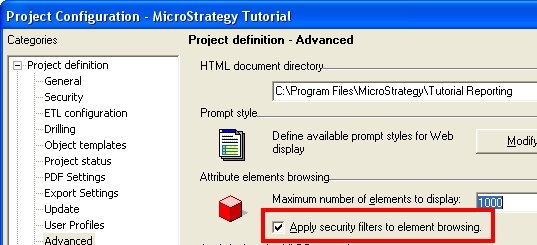
If a project contains a mix of prompts on attributes where security filters are sometimes required and sometimes not, then the use of security filters should be enabled at the project level, and enabled or disabled as required at the attribute level, as discussed below.
Attribute level capability to use the security filter for browsing:
The Strategy Intelligence Server provides an attribute level setting to allow or disallow element browse requests and the element cache to ignore the security filter in the cache key. This is useful where reports contain prompts on only some attributes that need security filters to be applied. In this case element browsing can be enabled for elements that do not apply security filters and are shared by users, and disabling element browsing for attributes that do apply security filters.
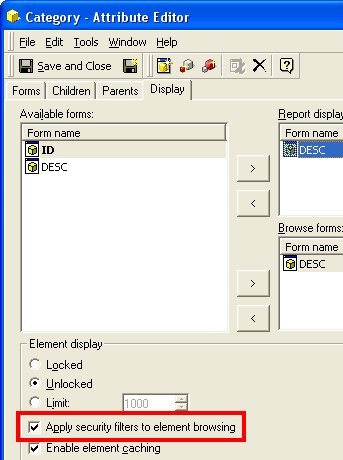
The option to apply security filters at the attribute level will only apply if the project-level setting (to apply security filters for element browsing) is also enabled. This setting is available in the attribute editor as shown below:
Ability to disable element cache at attribute level:
In addition to being able to apply security filters for element browsing at the attribute level, it is also possible to disable element caching at the attribute level. This setting is exposed in the attribute editor as well, and is called "Enable element caching". This setting is most useful in projects where certain attributes are highly volatile.
Element caches per user database connection:
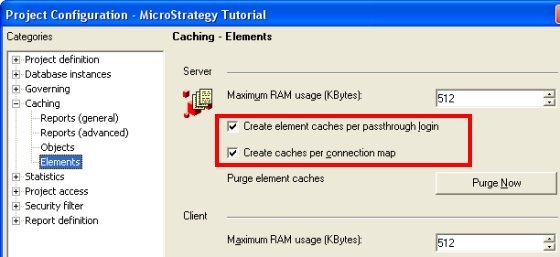
The Strategy Intelligence Server can be configured to create element caches based on the database connection and/or database login used by the logged in user. These are project level settings and only apply to the Intelligence Server. The screenshot of the settings in the Project Configuration - Caching - Elements is shown below:
Strategy Web optimization of hierarchy browse requests:
In the Strategy Intelligence Server, Strategy Web will use the drill path when requesting drill element requests from hierarchy prompts. The Strategy Intelligence Server will cache elements retrieved from element requests that use the drill (or browse) path. This improves performance for web requests.
Queuing of concurrently executing duplicate element requests:
In addition to the features discussed above, the Strategy Intelligence Server will queue simultaneous requests for the same element so that only one request executes against the warehouse. Other requests will wait until the first request completes and hit the element cache instead of the warehouse.
