EducationSoftwareStrategy.com
StrategyCommunity

Knowledge Base

Product

Community

Knowledge Base

TopicsBrowse ArticlesDeveloper Zone

Product

Download SoftwareProduct DocumentationSecurity Hub

Education

Tutorial VideosSolution GalleryEducation courses

Community

GuidelinesGrandmastersEvents
x_social-icon_white.svglinkedin_social-icon_white.svg
Strategy logoCommunity

© Strategy Inc. All Rights Reserved.

LegalTerms of UsePrivacy Policy
  1. Home
  2. Topics

KB19586: Microsoft SQL Server Analysis Services cubes include a large number of single-level hierarchies when imported into MicroStrategy


Community Admin

• Strategy


This article notes how Analysis Services cubes can contain a large number of single level hierarachies

SYMPTOM
 
When reviewing the structure of a Microsoft SQL Server Analysis Services cube imported into Strategy, users notice that each attribute defined in the cube's dimensions is imported as a separate hierarchy. In this example, in addition to the Geography hierarchy which includes hierarchical levels starting with Country and moving down to Employee, there are separate hierarchies for Call Center, Country, Employee, First Name and so on. Since this may be confusing to end-users, it may be desirable to remove these from Strategy.
 

ka04W000000ObvwQAC_0EM440000002Ela.gif

 
CAUSE
 
By default, SQL Server Analysis Services enables an "attribute hierarchy" for every attribute defined in a dimension. Each attribute hierarchy consists of two levels: "(All)," which rolls up all of the dimension's data into one element, and a level for the dimension attribute itself. These are presented to ODBO (OLE DataBase for OLAP) clients as hierarchies within the dimension, on an equal footing with user-defined, multilevel hierarchies also belonging to the dimension.
 
Strategy uses the ODBO object model for cube manipulation; so, the attribute hierarchies are received as part of the dimension's structure and they are reflected in the Strategy metadata.
 
ACTION
 
There are two ways to remove the attribute hierarchies. The first involves a change to the dimension's definition in SQL Server Analysis Services; the second takes place entirely within the Strategy metadata. One or the other is sufficient; it is not necessary to do both.
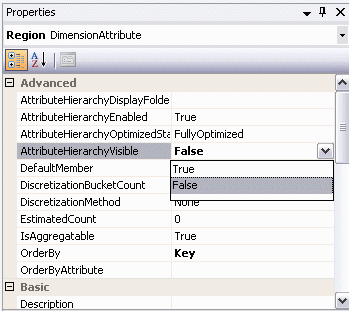
 

  • Analysis Services: Every dimension attribute in Analysis Services has a property, AttributeHierarchyVisible, which controls whether the single-attribute hierarchy will be available to clients. If this property is set to False, Strategy will not see the corresponding attribute hierarchy, and that hierarchy will consequently not be imported into the metadata. The following image shows where, in the SQL Server Business Intelligence Development Studio, this setting should be made. Note that this change will affect every client connecting to the cube.
ka04W000000ObvwQAC_0EM440000002Eln.gif
  •  
    After altering these properties, the dimension(s) must be reprocessed within Analysis Services. The new structure will then appear to Strategy when we importing the cube or updating its structure in the Strategy MDX Cube Catalog. Here, all attribute hierarchies have been disabled and only the user-defined Geography hierarchy remains visible.
     
ka04W000000ObvwQAC_0EM440000002ElY.gif
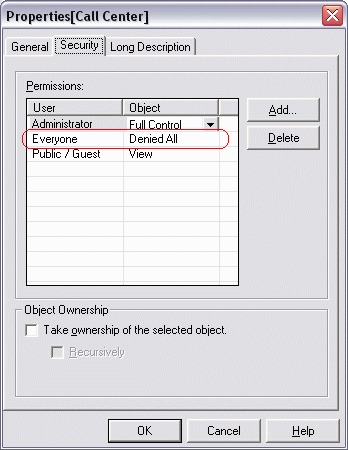
  • Strategy: Through the MDX Cube editor, a project administrator may also right-click on unwanted hierarchies to open the Properties window. On the Security tab, access control entries can be added to deny end-users access to these hierarchies. If this approach is taken, the single-level hierarchies will still appear to administrators in the cube structure; however, end-users lacking Architect privileges will not see the hierarchies to which they have been denied access.
ka04W000000ObvwQAC_0EM440000002Elm.gif

Comment

0 comments

Details

Knowledge Article

Published:

May 31, 2017

Last Updated:

May 31, 2017