SYMPTOM:
When migrating a system from development to test or to production, care must be used when warehouse tables of those databases have a different naming system.
In fact, a development system might have a warehouse with tables starting as 'Dev.TableName' and the same tables for the production system might be named as 'Prod.TableName'.
When the production project is created as a copy or in anyway merged from the development project and then pointed to the production database tables, it might encounter tables with a different system name than it expects, such as 'Dev.TableName' instead of 'Prod.TableName'.
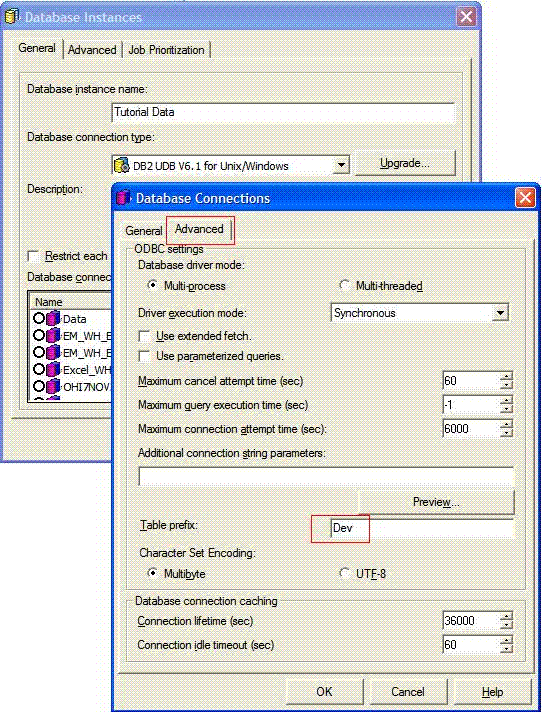
For physical tables, this problem can be resolved for example on the Advanced Settings of the Database Instance where the 'table space' name can be specified to match the name of the prefixes on the production warehouse.
On the following images, the location of the setting where users can do this adjusting is described:
However, if the project is also using logical tables, the logical table prefix will be the default one of the project ( PROD ) that might not match the real database prefix ( DEV) which the project is pointing to.
Logical tables if present in the project should be edited one by one adjusting the prefix manually.
CONFIGURATION:
Strategy 8.1.1
DB2 Data Warehouse
CAUSE:
The default prefix of the project doesn't match the prefix of tables present in the warehouse.
WORKAROUND:
In order to avoid changing the prefix of any logical view existing in a Strategy project, a modification of the odbc.ini file of the Strategy Intelligence Server can be used.
In order to perform this change, locate the odbc.ini file of the DB2 Database Server. This file allows for a statement that is not by default on the file itself. This control is 'AlternateID' if the ODBC file is edited adding the following line, where "Dev" is the name of the prefix of the database where the project is pointing. Now logical tables will work as expected:
AlternateID=DEV
WARNING:
The third-party product(s) discussed in this technical note is manufactured by vendors independent of Strategy. Strategy makes no warranty, express, implied or otherwise, regarding this product, including its performance or reliability.
