SYMTOM
When using out of box Strategy SDK code, SSOESM.java, the client IP Address does not appear in the User Connection Monitor, as shown below. SSOESM.java is found under C:\Program Files\MicroStrategy\SDK\samples\java\sso.
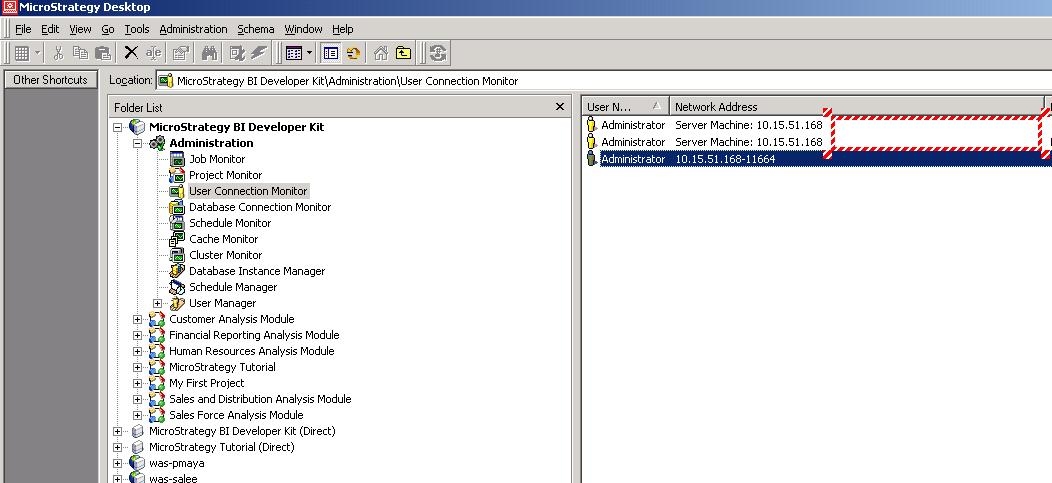
ACTION
To resolve this issue, add userSession.setClientID(cntSvcs.getRemoteAddress()); before userSession.getSessionID();
For example, the code above should be added during user session creation as shown below.
///////////////////////////////////////////////
//Step 4. create user session
try {
WebIServerSession userSession = WebObjectsFactory.getInstance().getIServerSession();
String project = reqKeys.getValue(EnumWebParameters.WebParameterLoginProjectName);
userSession.setProjectName(project);
userSession.setServerName(IServer);
userSession.setLogin(SSOUserID);
userSession.setPassword(pwd);
userSession.setServerPort(portNum);
// The following line of code sets the client IP Address
userSession.setClientID(cntSvcs.getRemoteAddress());
userSession.getSessionID();
String sessionState = userSession.saveState(EnumWebPersistableState.MAXIMAL_STATE_INFO);
cntSvcs.setSessionAttribute(SESSION_STATE, sessionState);
} catch (Exception e) {
errorContainer.set(new ErrorInfo(ErrorInfo.MSTR_EXCEPTION_CREATE_SESSION, e.getMessage()));
return false;
}
