When running services that use different locales for data formatting either at the service, user, information source or publication level, the user might notice that the formatting does not correspond to the actual regional settings located in Control Panel of the Strategy Narrowcast Server machine.
The Regional settings used for the document formatter belong to the domain user account under which the Strategy Execution Engine service is running. To verify this account, check the service under Control Panel, edit the properties of the Strategy Execution Engine service, and go to the Log on tab as shown below:
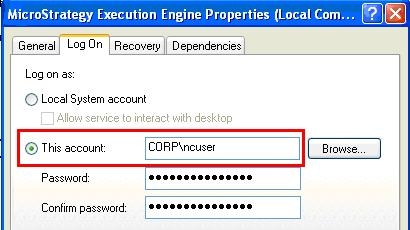
If the NT user that is logged into the Strategy Narrowcast Server machine differs from the Strategy Execution Engine service user, it is possible their Regional settings differ too causing different results in the data formatting. If the user wants to verify the settings that are being considered for the document formatter, log into the Strategy Narrowcast Server machine with the domain user account under which the Strategy Execution Engine service is running. Check the Regional settings in Control panel and modify them to the desired output. After running the services again the format should display correctly.
Note. For reports sent as Microsoft Excel documents, the formatting will match the Regional setting for the user currently logged into the machine; hence in the scenario just described, it is possible that the result between plain text and Microsoft Excel would differ.
