EducationSoftwareStrategy.com
StrategyCommunity

Knowledge Base

Product

Community

Knowledge Base

TopicsBrowse ArticlesDeveloper Zone

Product

Download SoftwareProduct DocumentationSecurity Hub

Education

Tutorial VideosSolution GalleryEducation courses

Community

GuidelinesGrandmastersEvents
x_social-icon_white.svglinkedin_social-icon_white.svg
Strategy logoCommunity

© Strategy Inc. All Rights Reserved.

LegalTerms of UsePrivacy Policy
  1. Home
  2. Topics

KB19654: How to obtain the Report Execution Time in MicroStrategy Integrity Manager 9.x-10.x?


Community Admin

• Strategy


In MicroStrategy Integrity Manager, users can run performance tests to determine how long it takes an Intelligence Server to execute a given set of reports or documents. For more information refer to the following technote:

In Strategy Integrity Manager, users can run performance tests to determine how long it takes an Intelligence Server to execute a given set of reports or documents. For more information refer to the following technote:
 
KB5703-812-0012 New feature in Strategy Integrity Manager: Performance tests and cycles.
 
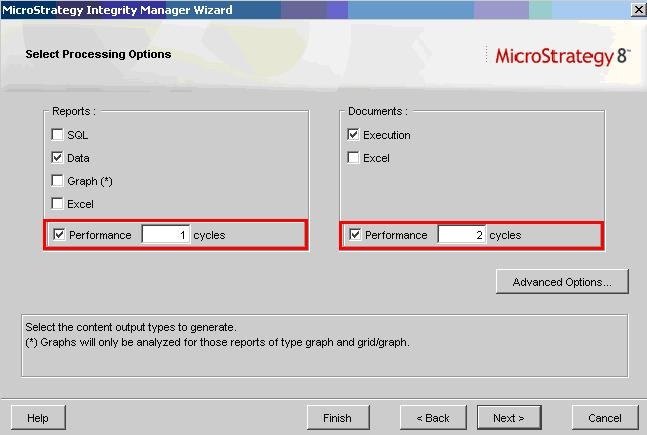
When running an integrity test, users might want to get the execution time of the report or document. In order to obtain those values, users must select at least one performance cycle in the Processing options window as shown in the following image:
 

ka04W000000OgsfQAC_0EM440000002Egl.jpeg

 
Once the test is completed, the user will get the minimum, maximum and average time of execution in both base and target projects (in case of project versus project integrity test).


Comment

0 comments

Details

Knowledge Article

Published:

June 8, 2017

Last Updated:

June 8, 2017