Is Strategy Developer a Unicode program?
Strategy Developer is not a Unicode program, i.e. Strategy Developer is not specifically coded to take advantage of Unicode function calls.
How can Strategy Developer display characters from a certain character set, e.g. Russian, Chinese, Japanese?
The user has to set the Windows Operating System setting 'Language for non-Unicode programs' (also known as 'System Locale' in Windows 2000) accordingly.
To change that setting, follow the instructions below:
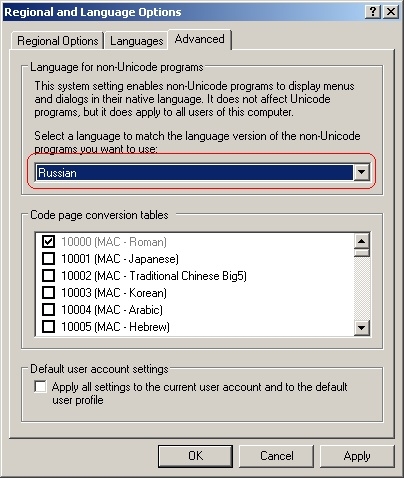
Note: Only non-Unicode programs are affected by this setting. The language selected for this option does not change the interface of Windows or other Unicode programs.
Can Strategy Developer simultaneously display characters from various different character sets?
Strategy Developer is not able to simultaneously display characters from different character sets. For instance, it is not possible to display Russian and Chinese characters at the same time in the Strategy Developer GUI, because the display of Russian characters would require the setting 'Language for non-Unicode programs' to be set to Russian whereas Chinese characters are only displayed if that setting was set to Chinese.
Note: Strategy Web is able to simultaneously display characters from different character sets.
Third Party Software:
WARNING:
The third-party product(s) discussed in this technical note is manufactured by vendors independent of Strategy. Strategy makes no warranty, express, implied or otherwise, regarding this product, including its performance or reliability.
