SYMPTOM
Under the following conditions, Strategy 8.x reports may encounter type mismatch errors when executing report SQL:
For example, a user may create a metric to return the latest Order Date at report level:
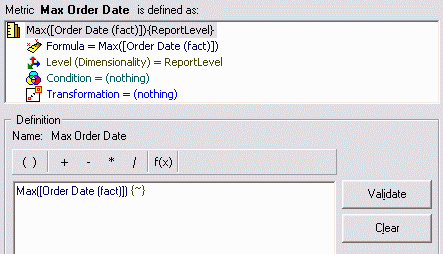
This metric may then be used in an ApplySimple expression to modify the result of another metric.
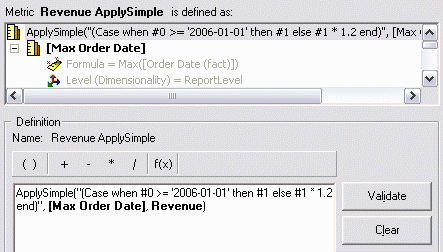
ApplySimple("(Case when #0 >= '2006-01-01' then #1 else #1 * 1.2 end)", , Revenue)
Running a report containing this metric against Microsoft SQL Server produces the following error:
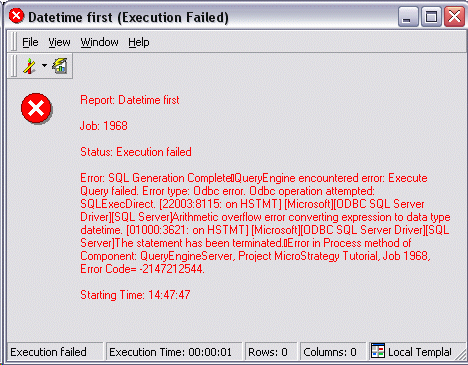
Error: SQL Generation Complete
QueryEngine encountered error: Execute Query failed. Error type: Odbc error. Odbc operation attempted: SQLExecDirect. Arithmetic overflow error converting expression to data type datetime. The statement has been terminated.
Error in Process method of Component: QueryEngineServer, Project Strategy Tutorial, Job 1968, Error Code= -2147212544.
The report SQL reveals the source of the data type conversion error. The intermediate table for the template metric is created with a Datetime column for the metric, when the expression actually returns a floating-point Revenue value.
create table #ZZTTL0001IOEA000(
CATEGORY_ID SMALLINT,
WJXBFS1 DATETIME)
insert into #ZZTTL0001IOEA000
select a13.CATEGORY_ID CATEGORY_ID,
(Case when max(a11.ORDER_DATE) >= '2006-01-01' then sum((a11.QTY_SOLD * (a11.UNIT_PRICE - a11.DISCOUNT))) else sum((a11.QTY_SOLD * (a11.UNIT_PRICE - a11.DISCOUNT))) * 1.2 end) WJXBFS1
from ORDER_DETAIL a11
join LU_ITEM a12
on (a11.ITEM_ID = a12.ITEM_ID)
join LU_SUBCATEG a13
on (a12.SUBCAT_ID = a13.SUBCAT_ID)
group by a13.CATEGORY_ID
select pa11.CATEGORY_ID CATEGORY_ID,
a12.CATEGORY_DESC CATEGORY_DESC,
pa11.WJXBFS1 WJXBFS1
from #ZZEA00 pa11
join LU_CATEGORY a12
on (pa11.CATEGORY_ID = a12.CATEGORY_ID)
drop table #ZZTTL0001IOEA000
Note: Normally, reports against SQL Server will use implicit table creation, which avoids this problem because the database infers column datatypes from each query. Also, this report requires only one SQL pass typically. The error was produced by making the following VLDB property changes:
CAUSE
The error occurs because Strategy SQL Generation Engine is unable to resolve the ambiguous datatype of the metric expression.
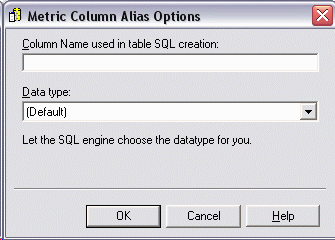
By default, new metrics are created without a datatype defined in the metric column alias options. The "(Default)" option carries the explanation, "Let the SQL engine choose the datatype for you." When this option is selected, Strategy SQL Generation Engine examines the data types of objects used in the metric expression to determine the expected datatype of the result.
The metric expression in the above example refers to metrics that have different datatypes: Datetime and Float. A human reader can see from the ApplySimple SQL string that the revenue value will be returned (meaning that the datatype should be Float). By design, however, Strategy SQL Generation Engine 8.x does not parse the contents of the SQL string and it cannot anticipate differences in database implementations of standard (or nonstandard) functions. In this ambiguous situation, then, the Engine falls back to the first object appearing in the formula. Since this is the Max Order Date metric, Datetime is chosen as the type for the ApplySimple.
ACTION
Whenever more than one datatype is used in a metric expression, the safest course of action is to specify the result datatype explicitly in the Metric Column Alias Options dialog box. This dialog is reached in the metric editor through the Tools menu, under Advanced Settings > Metric Column Options. Indicating that the result should be floating-point will produce the correct datatype in explicit CREATE TABLE statements.
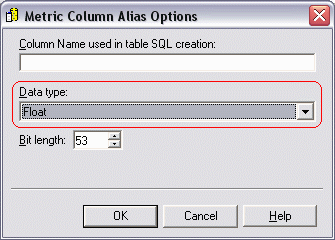
create table #ZZEA00(
CATEGORY_ID SMALLINT,
WJXBFS1 FLOAT(53))
Note: Additional datatype parameters such as bit length, precision or scale should be chosen according to database specifications. FLOAT(53) equates to double precision floating-point in SQL Server. Other database platforms may require different sizes.
It might also be possible to replace ApplySimple with a combination of Strategy internal functions. Strategy SQL Generation Engine 8.x is better able to anticipate the resulting datatype of a function over which it has control, and this may avoid some datatype mismatches of this sort. For the above example, the metric may be rewritten using the IF function, and the resulting SQL shows correct datatypes throughout.
IF(( >= '1/1/2006'), Revenue, (Revenue * 1.2))
This metric definition produces the following SQL, with no Datetime columns for Revenue values.
create table #ZZMD00(
CATEGORY_ID SMALLINT,
WJXBFS1 DATETIME,
Revenue FLOAT,
WJXBFS2 FLOAT)
insert into #ZZMD00
select a13.CATEGORY_ID CATEGORY_ID,
max(a11.ORDER_DATE) WJXBFS1,
sum((a11.QTY_SOLD * (a11.UNIT_PRICE - a11.DISCOUNT))) Revenue,
(sum((a11.QTY_SOLD * (a11.UNIT_PRICE - a11.DISCOUNT))) * 1.2) WJXBFS2
from ORDER_DETAIL a11
join LU_ITEM a12
on (a11.ITEM_ID = a12.ITEM_ID)
join LU_SUBCATEG a13
on (a12.SUBCAT_ID = a13.SUBCAT_ID)
group by a13.CATEGORY_ID
select pa11.CATEGORY_ID CATEGORY_ID,
a12.CATEGORY_DESC CATEGORY_DESC,
(Case when pa11.WJXBFS1 >= '2006-01-01' then pa11.Revenue else pa11.WJXBFS2
end) WJXBFS1
from #ZZMD00 pa11
join LU_CATEGORY a12
on (pa11.CATEGORY_ID = a12.CATEGORY_ID)
drop table #ZZMD00
