SYMPTOM
Under the following circumstances, join conditions may be missing from Strategy SQL Generation Engine report SQL:
To illustrate the issue, a dimension table was created for the Item, Brand, and Subcategory attributes in the Strategy Tutorial project. The attributes were edited to use the new dimension table as the primary lookup table for all three attributes.
A report with the attributes Subcategory and Brand (parents in the dimension table) and Month (an unrelated attribute), and the metrics Revenue and Web Sales demonstrates the problem. Observe that the results have multiple sections for "Audio Equipment" with different IDs, where there should just be one ID per description. Also, several metric result rows are replicated across multiple report rows, which is a symptom that some rows are being Cartesian joined.
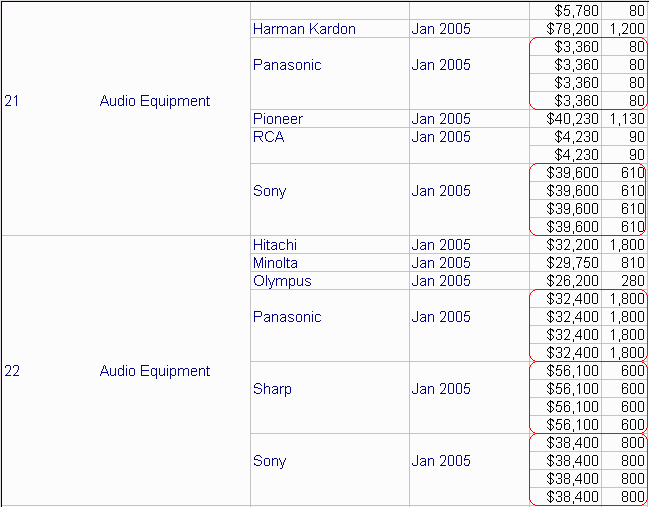
In the final pass of report SQL, the metric results are joined to the dimension table based only on the BRAND_ID column, meaning that any Brand associated with more than one Subcategory will replicate rows. For correct results, the dimension table should be joined using both BRAND_ID and SUBCAT_ID.
select distinct pa11.[SUBCAT_ID] AS SUBCAT_ID,
a13.[SUBCAT_DESC] AS SUBCAT_DESC,
pa11.[BRAND_ID] AS BRAND_ID,
a13.[BRAND_DESC] AS BRAND_DESC,
pa11.[MONTH_ID] AS MONTH_ID,
a14.[MONTH_DESC] AS MONTH_DESC,
pa11.[Revenue] AS Revenue,
pa12.[WJXBFS1] AS WJXBFS1
from [ZZTSP00C52YMD000] pa11,
[ZZTSP00C52YMD001] pa12,
[DIM_ITEM] a13,
[LU_MONTH] a14
where pa11.[BRAND_ID] = pa12.[BRAND_ID] and
pa11.[MONTH_ID] = pa12.[MONTH_ID] and
pa11.[SUBCAT_ID] = pa12.[SUBCAT_ID] and
pa11.[BRAND_ID] = a13.[BRAND_ID] and
pa11.[MONTH_ID] = a14.[MONTH_ID]
CAUSE
This behavior involves the resolution of key attributes on the tables involved in the query. Whenever possible, the Strategy SQL Generation Engine prefers to join key attributes held in common on the two tables being joined. Common key attributes are sometimes not present.
The intermediate tables for the template metrics have a key dimensionality of {Subcategory, Brand, Month}. The key of the Item dimension table, however, is Item. Since none of these attributes are in common, the Engine chooses an available attribute that does exist on both tables (in this case, Brand) and joins on this attribute only.
This behavior occurs, however, only when there is an attribute in the key dimensionality of one of the tables that is unrelated to the dimension table. If the Month attribute were removed from the above report, the Engine would join on both attributes' ID columns.
ACTION
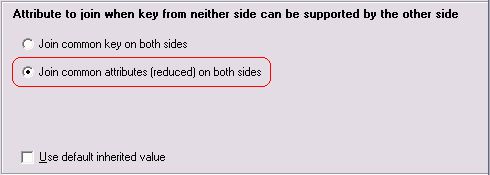
Modify the VLDB Properties for the affected report to change the property Joins > Attribute to join when key from neither side can be supported by the other side. The default setting is "Join common key on both sides," which has the side effect of reducing the join columns in this case.
After changing the setting to "Join common attributes (reduced) on both sides," the same report generates a correct final pass and reasonable results.
select distinct pa11.[SUBCAT_ID] AS SUBCAT_ID,
a13.[SUBCAT_DESC] AS SUBCAT_DESC,
pa11.[BRAND_ID] AS BRAND_ID,
a13.[BRAND_DESC] AS BRAND_DESC,
pa11.[MONTH_ID] AS MONTH_ID,
a14.[MONTH_DESC] AS MONTH_DESC,
pa11.[Revenue] AS Revenue,
pa12.[WJXBFS1] AS WJXBFS1
from [ZZTSP00C5K5MD000] pa11,
[ZZTSP00C5K5MD001] pa12,
[DIM_ITEM] a13,
[LU_MONTH] a14
where pa11.[BRAND_ID] = pa12.[BRAND_ID] and
pa11.[MONTH_ID] = pa12.[MONTH_ID] and
pa11.[SUBCAT_ID] = pa12.[SUBCAT_ID] and
pa11.[BRAND_ID] = a13.[BRAND_ID] and
pa11.[SUBCAT_ID] = a13.[SUBCAT_ID] and
pa11.[MONTH_ID] = a14.[MONTH_ID]
