This article outlines the procedure to configure the nCluster ODBC driver for Aster for connectivity to an Aster nCluster database:
Following screenshot shows the basic DSN setup for connectivity:
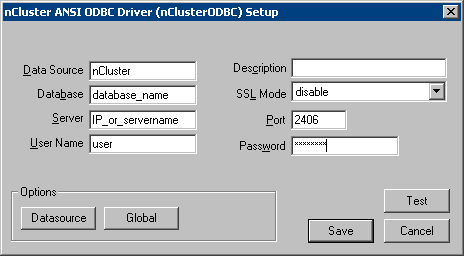
In the above example, enter the IP address or server name in the 'Server' field, 2406 is the Port number, enter the database name in the 'Database' field, and enter the user name and password in the 'User Name' and 'Password' fields, respectively (the password appears encrypted). The name of the DSN is nCluster. The user can test the connection by clicking on the 'Test' button.
Third Party Software Installation:
WARNING:
The third-party product(s) discussed in this technical note is manufactured by vendors independent of Strategy. Strategy makes no warranty, express, implied or otherwise, regarding this product, including its performance or reliability.
