It might be desired to count attribute elements by using a fact table rather than a lookup table. This might be required for example when the customers who carried out purchases should be calculated. The fact table count can also be used in comparison of calculations and time related calculations.
Practical examples could be to count customers who made purchases in a certain month compared to customers who made purchases during the whole year. Also, comparisons such as the count of customers who carried out a purchase in December this year in comparison to customers who purchased something in December last year.
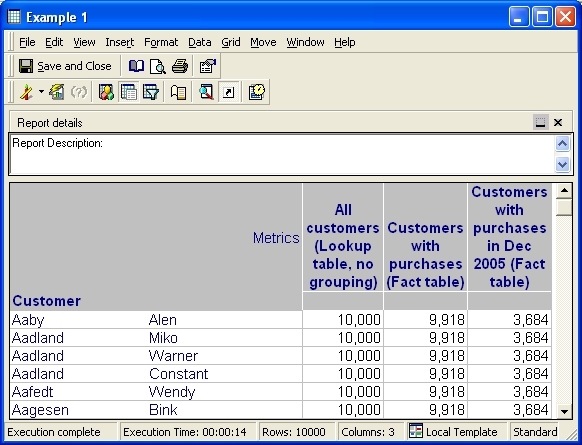
Synopsis: Figure 1 describes different scenarios that are described later in greater detail. The count function parameters used in the metric should be changed to Distinct Count and a suitable FactID should be selected in order to use the correct fact to calculate the customers. Also practical examples are used in this document in order to illustrate the functionality of a fact table count based on the Strategy Tutorial data model.
Figure 1.
EXAMPLES:
This section describes what is being calculated when a fact table or lookup table is used in a metric calculation. There are three examples described in this section. More details about the respective metric structures can be found in the Metric Design section. The last section called SQL Analysis describes in detail how the SQL is generated for each of the metrics.
Metric 1:
The first metric All customers (lookup table, no grouping) is calculating all the customers in the Warehouse. With report level grouping the results of the metric would be one for each customer, but since the report level is removed from the metric all the values can be retrieved from the lookup table. In other words there are 10,000 customers in the lookup table which means that this is the total amount of customers in the warehouse. The second example describes how to count only the customers who have made a purchase.
Metric 2:
The second metric Customers with purchases (fact table) is counting all the customers that have made purchases. The results are calculated from CUSTOMER_SLS fact table. The metric is designed with the help of Units Sold fact. The result is not the same, then, in the first example because it might be that not all the customers made purchases. This metric shows that 9,918 customers of 10,000 have made purchases at all times.
Metric 3:
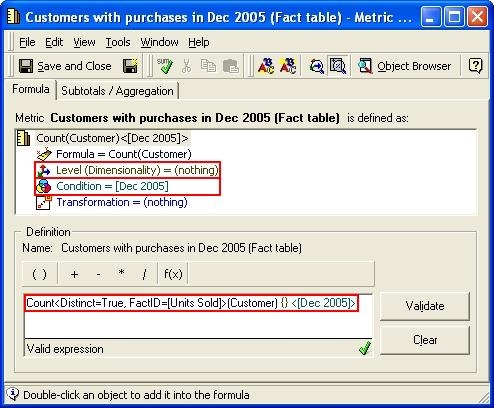
The third metric Customers with Purchases in Dec 2005 (fact table) calculates customers who carried out a purchase(s) in December 2005. The customers are calculated from a fact table as in the second metric, but in this example a specific month is used as a filter in the metric. This type of metric can be used for example to identify customers who did shopping during Christmas sales in 2005. In total 3,684 customers did purchase something in December 2005.
METRIC DESIGN:
Example 1:
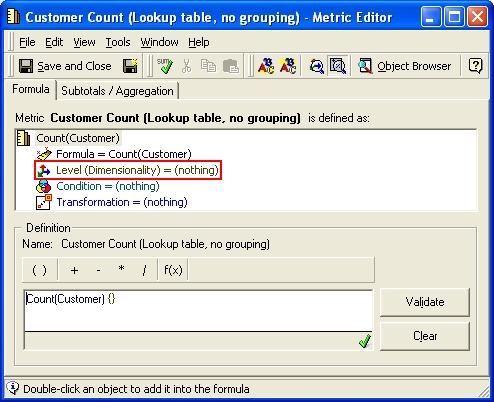
All the examples are based on the first metric which is calculating Customer attribute IDs. The report level is removed from the metric in order to avoid grouping. This is highlighted in Figure 2.
Figure 2.
Example 2:
Figure 3 describes the metric used in example 2. The report level remains removed as in the first example, but in this one also function parameters with count function are changed.
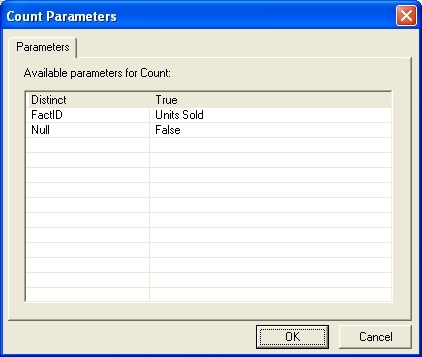
Function Parameters: Function parameters can be changed by right clicking the count function in the metric definition and selecting the last option count Parameters.
Figure 4 and the following list describe the correct function parameters to use:
Figure 3.
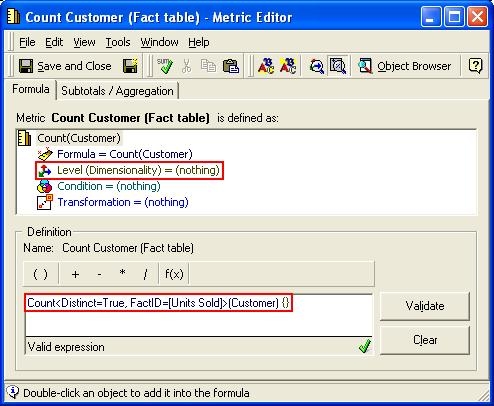
Figure 4.
Example 3:
The last metric is similar to the one used in example 2 except in this one time conditionality is used. This metric allows the report to calculate customers who carried out purchases in December 2005. The function parameters are highlighted in Figure 5.
Figure 5.
SQL ANALYSIS:
In all the examples the first SQL pass is selecting the desired amount of Customers (CUSTOMER_ID) that are then used in the second pass in order to retrieve the non-ID forms (first name, last name etc.). In every SQL statement two passes can be seen.
Example1:
It is clearly seen in the first SQL pass that the count is performed against Customer lookup table LU_CUSTOMER. Because the report level is removed from the metric the grouping clause is not shown in the report SQL.
select count(a11.CUSTOMER_ID) WJXBFS1
into #ZZMD00
from LU_CUSTOMER a11
select distinct a12.CUSTOMER_ID CUSTOMER_ID,
a12.CUST_LAST_NAME CUST_LAST_NAME,
a12.CUST_FIRST_NAME CUST_FIRST_NAME,
pa11.WJXBFS1 WJXBFS1
from #ZZMD00 pa11
cross join LU_CUSTOMER a12
Example 2:
It can be seen in the report SQL that the customers are calculated from CUSTOMER_SLS fact table. Units Sold fact is related to CUSTOMER_SLS table and this is allowing the metric to use the desired fact table to count the customers. The function parameters are defined to use DISTINCT count. Function parameters are also defining that a fact table should be used instead of the lookup table.
select count(distinct a11.CUSTOMER_ID) WJXBFS1
into #ZZMD00
from CUSTOMER_SLS a11
select distinct a12.CUSTOMER_ID CUSTOMER_ID,
a12.CUST_LAST_NAME CUST_LAST_NAME,
a12.CUST_FIRST_NAME CUST_FIRST_NAME,
pa11.WJXBFS1 WJXBFS1
from #ZZMD00 pa11
cross join LU_CUSTOMER a12
Example 3:
The calculation is done with the help of Units Sold fact as in example 2, but in this example ORDER_DETAIL fact table is used. This is because this fact table includes both, CUSTOMER_ID and ORDER_DATE that can be then joined to MONTH_ID in order to relate the customers who did a purchase in the specific month (December 2005).
select count(distinct a11.CUSTOMER_ID) WJXBFS1
into #ZZMD00
from ORDER_DETAIL a11
join LU_DAY a12
on (a11.ORDER_DATE = a12.DAY_DATE)
where a12.MONTH_ID in (200512)
select distinct a12.CUSTOMER_ID CUSTOMER_ID,
a12.CUST_LAST_NAME CUST_LAST_NAME,
a12.CUST_FIRST_NAME CUST_FIRST_NAME,
pa11.WJXBFS1 WJXBFS1
from #ZZMD00 pa11
cross join LU_CUSTOMER a12
NOTES:
For more information about metric parameters, refer to the following Strategy Knowledge Base technical notes:
