EducationSoftwareStrategy.com
StrategyCommunity

Knowledge Base

Product

Community

Knowledge Base

TopicsBrowse ArticlesDeveloper Zone

Product

Download SoftwareProduct DocumentationSecurity Hub

Education

Tutorial VideosSolution GalleryEducation courses

Community

GuidelinesGrandmastersEvents
x_social-icon_white.svglinkedin_social-icon_white.svg
Strategy logoCommunity

© Strategy Inc. All Rights Reserved.

LegalTerms of UsePrivacy Policy
  1. Home
  2. Topics

KB19713: Administration privileges granted using security roles do not get applied to the user in MicroStrategy Desktop (Developer) 9.x and 10.x


Stefan Zepeda

Salesforce Solutions Architect • Strategy


Administration privileges granted using security roles do not get applied to the user in MicroStrategy Desktop (Developer) 9.x and 10.x

SYMPTOM:
Administration privileges granted using security roles do not get applied to the user in Strategy Desktop (Developer) 9.x and 10.x.
 
STEPS TO REPRODUCE:
Follow the steps below to reproduce this issue:
 

  • Create a new security role with Administration privileges, as shown below:
ka02R000000kXzbQAE_0EM440000002Ehj.gif
    • Use Strategy Object Manager 9.x.
    • Bypass all object security access checks.
  • Create a new user and grant the security role created in step 1, as shown below:
ka02R000000kXzbQAE_0EM440000002Ehr.gif
  • Launch the Project Merge Wizard with the newly created user, as shown below:
ka02R000000kXzbQAE_0EM440000002Ehk.gif
  • 
    You are attempting to login without the proper privileges. Please log in as a user member of the administrators group before proeeding.

 
CAUSE:
Security roles can only assign privileges that can be granted at project level. Privileges under Administration are applied at the user/group level and not hte project level.
 
ACTION:
Grant privileges at the user/group level. In the example below, grant the 'Bypass all object security access checks' privilege at the user group level:
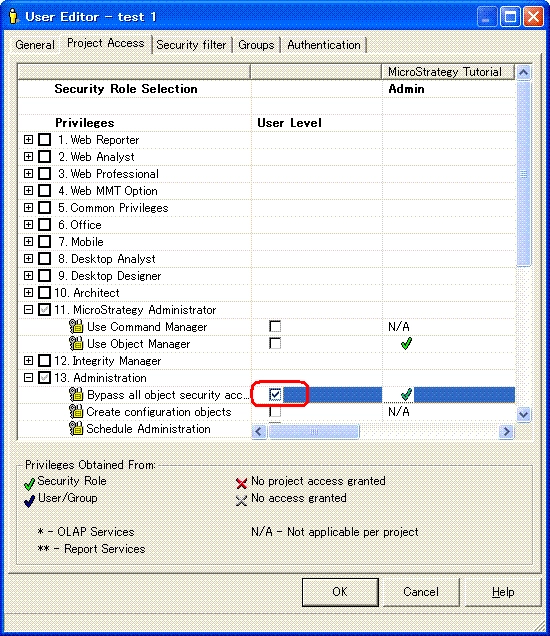
 

ka02R000000kXzbQAE_0EM440000002Ehs.gif

 
The Strategy Internal Reference Number for the issue discussed in this technical note is DE34737. 


Comment

0 comments

Details

Knowledge Article

Published:

June 12, 2017

Last Updated:

June 12, 2017