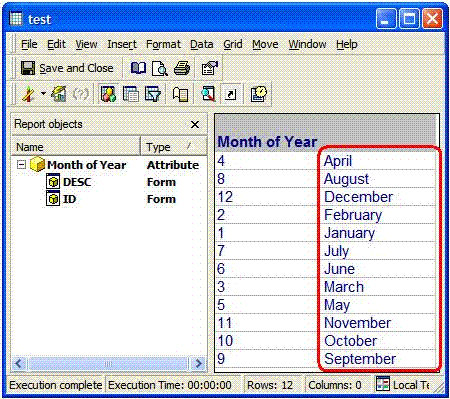
Usually attributes are by default sorted by their ID field; however users might need to sort them by their description field, as for instance when the attribute is placed on a page-by section of a report and the user wishes to see the attribute displayed by Description and sort by alphabetic order.
In the picture below, the report is set to display both forms, and the sort order is ascending by ID:
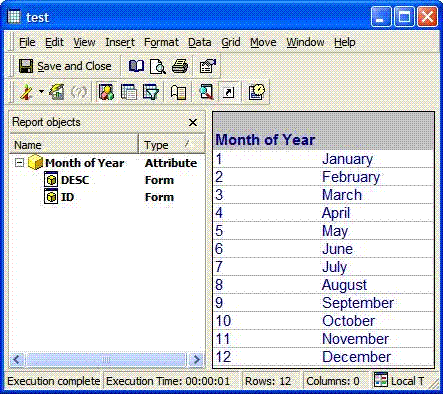
In order to display and sort an attribute by Description and in alphabetical order, an example based on the attribute 'Month of the Year' from the Strategy Tutorial project has been shown.
The attribute Month of the Year, as with many other attributes, does not have a preferred sort order either in the ID or in the DESC field, therefore its order depends directly on the query and therefore on its database order. Strategy usually retrieves attributes by their ID (if desired the description can be associated with it); therefore the default order is the warehouse order.
This can be seen running the SQL query of the above report on the ODBC test tool, the SQL view of this report show:
select a11.MONTH_OF_YEAR MONTH_OF_YEAR,
a11.MONTH_OF_YEAR_NAME MONTH_OF_YEAR_NAME
from LU_MONTH_OF_YEAR a11
Where MONTH_OF_YEAR is the ID field of the attribute and MONTH_OF_YEAR_NAME its description field. This query will bring back the following results from the warehouse:
This will be the default order of the attribute in the report:
However, this order can be altered from the Attribute Editor, setting the order of the ID field or the DESCRIPTION field either to 'ASCENDING' or 'DESCENDING' sort order.
Obviously to have effect, the changes on the sort order will be applied only to one of the two fields, either the ID field or the DESC field, leaving respectively the other field sort order to 'none'.
Contrasting sort orders (for example ID sort Ascending and DESC sort descending ) cannot apply at the same time. In this case, the sort order will be the warehouse default one as shown above.
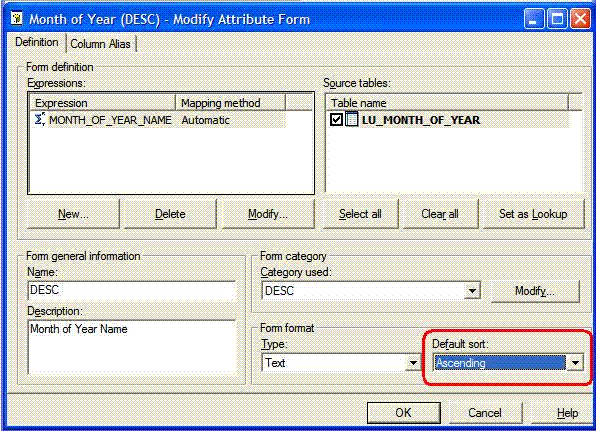
Based on what is described above, if users need to display an attribute with the DESC order ascending (alphabetical order) instead of the default warehouse sort order, they need to change the attribute DESC form, applying an ascending sort order as shown below:
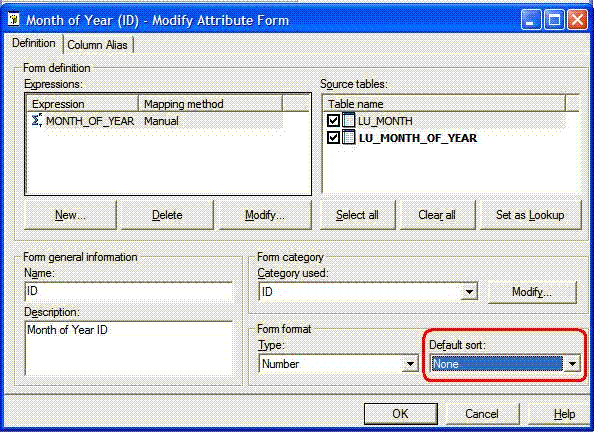
They should also ensure to leave the ID form sort order to 'none' as in the following picture:
The result will be the desired sorting of the report on the DESC field on the MONTH OF THE YEAR attribute, as shown below: