EducationSoftwareStrategy.com
StrategyCommunity

Knowledge Base

Product

Community

Knowledge Base

TopicsBrowse ArticlesDeveloper Zone

Product

Download SoftwareProduct DocumentationSecurity Hub

Education

Tutorial VideosSolution GalleryEducation courses

Community

GuidelinesGrandmastersEvents
x_social-icon_white.svglinkedin_social-icon_white.svg
Strategy logoCommunity

© Strategy Inc. All Rights Reserved.

LegalTerms of UsePrivacy Policy
  1. Home
  2. Topics

KB19752: How to enable an Information Source to support dynamic subscriptions in MicroStrategy Narrowcast Server 9.x - 10.x


Community Admin

• Strategy


In MicroStrategy Narrowcast Server 9.x - 10.x, users may configure an Information Source to support dynamic subscriptions.

In Strategy Narrowcast Server 9.x - 10.x, users may configure an Information Source to support dynamic subscriptions. Follow the steps below to configure an Information Source to support this type of subscriptions.
 
For a list of supported data types and formats of for each of the subscription information properties used in dynamic subscription sets, refer to the following Strategy Knowledge Base technical note:
KB10469 - What are the data types and formats of subscription information for dynamic subscription sets?
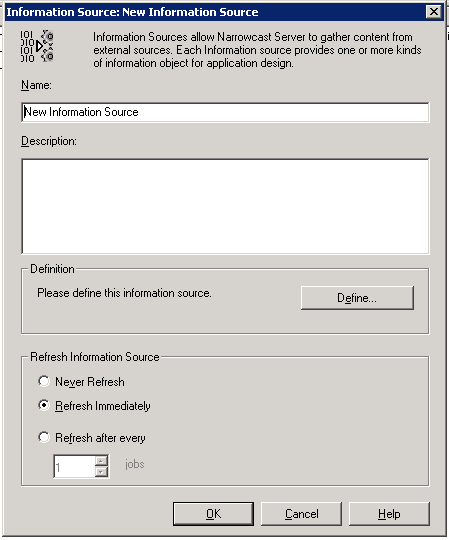
 

  • Create a new Information Source or edit an existing Information Source:
ka04W000001MKtUQAW_0EM440000002Hvt.png
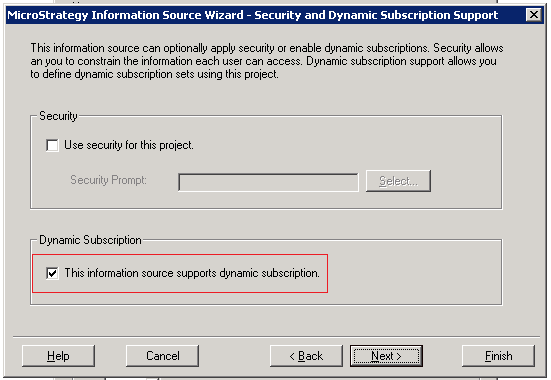
  • Towards the end of the wizard, on the 'Security and dynamic subscription support' section, check the 'This information source supports dynamic subscription' box under the 'Dynamic Subscriptions' and click on 'Next':
ka04W000001MKtUQAW_0EM440000002Hvy.png
  • Define the 'User and Subscription Properties' selecting the ID form of the Attribute used for each of the subscription information types:
ka04W000001MKtUQAW_0EM440000002Hw3.png
  • Note: This example uses the same attribute and attribute form for all three settings. These may actually be different in each implementation.
     
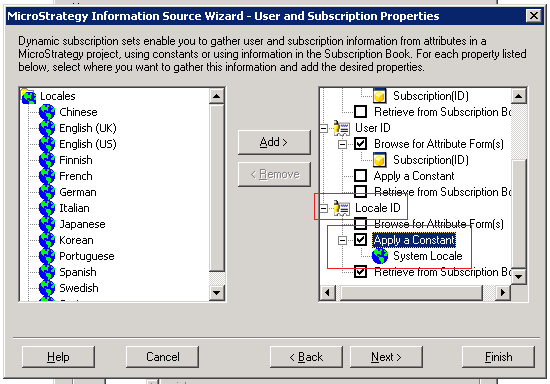
  • Define an Attribute form for the Locale or apply a Constant and click on 'Next':
ka04W000001MKtUQAW_0EM440000002Hw8.png
  • Define the 'Address Properties' section by selecting the corresponding Attribute Forms or apply a constant values:
ka04W000001MKtUQAW_0EM440000002HwD.png
  • Define an Attribute form for the 'Device', 'Transmission Properties', 'Pin', 'Time Zone', and 'Delivery Window' properties or 'Apply a Constant' and click on 'Next':
ka04W000001MKtUQAW_0EM440000002HwI.png
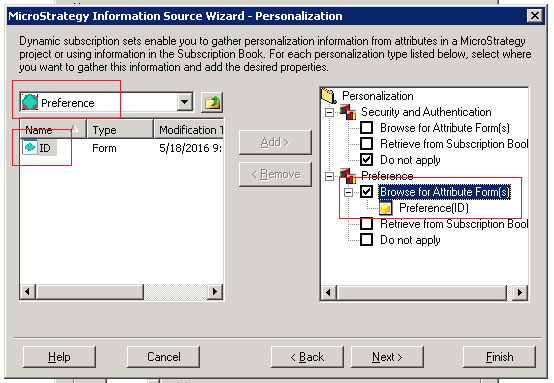
  • Define an Attribute form for 'Security and Authentication' if needed and specify the Attribute Form that will be used for the 'Preference' and click on 'Next':
ka04W000001MKtUQAW_0EM440000002HwN.png
  • This concludes the configuration, click on 'Finish' to save the changes.

 
Once an Information Source has been configured to support Dynamic Subscriptions, it can be used when creating Subscription Information Objects (IO):
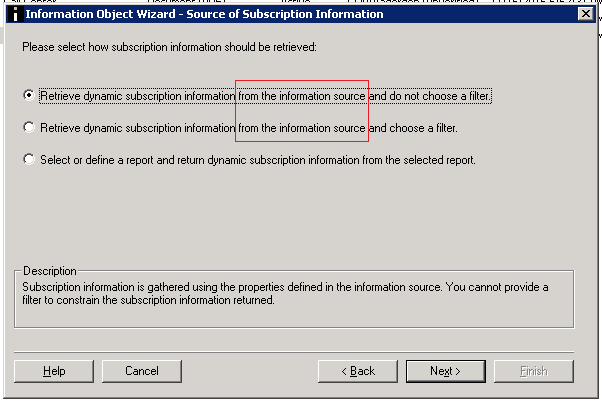
ka04W000001MKtUQAW_0EM440000002HwX.png

 
For more information on how to create a Subscription Information Object refer to the following Strategy Knowledge Base technical note:
KB10492 - What are the requirements and considerations for dynamic subscription services?


Comment

0 comments

Details

Knowledge Article

Published:

April 4, 2017

Last Updated:

April 4, 2017