In Strategy 9.x, before populating data in the fact tables, a custom time window data load first removes the already existing rows from the fact tables for the time period specified.
For example, a user performs custom time window data load for January 13 - February 12, 2013 as shown below:
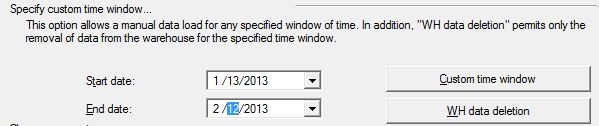
As seen in the MSTRMigration log below, the rows are first removed from the fact tables listed below:
An excerpt from the MSTRMigration log (with SQL enabled) is shown below. For details on how to enable SQL to be seen in the MSTRMigration log, go to the following Strategy Knowledge Base technical note:
KB30594: How to enable the SQL executed during the Strategy Enterprise Manager 9.x data load (ETL) to be logged to the MSTRMigration.log
---------------------------------------------------------
Remove data from custom time window
---------------------------------------------------------
2/13/2013 10:46:27 AM   Server: LOCALHOST Project name: Strategy TUTORIAL
2/13/2013 10:46:27 AM   Begining of Window : 1/13/2013 12:00:01 AM
2/13/2013 10:46:27 AM   End of Window : 2/12/2013 11:59:59 PM
2/13/2013 10:46:27 AM   Removing data from table 'IS_REP_FACT'.
2/13/2013 10:46:27 AM   DELETE FROM IS_REP_FACT WHERE EM_RECORD_TS BETWEEN '01/13/2013 00:00:01' AND '02/12/2013 23:59:59'
2/13/2013 10:46:27 AM   Removing data from table 'IS_DOC_FACT'.
2/13/2013 10:46:27 AM   DELETE FROM IS_DOC_FACT WHERE EM_RECORD_TS BETWEEN '01/13/2013 00:00:01' AND '02/12/2013 23:59:59'
2/13/2013 10:46:27 AM   Removing data from table 'IS_SESSION'.
2/13/2013 10:46:27 AM   DELETE FROM IS_SESSION WHERE EM_RECORD_TS BETWEEN '01/13/2013 00:00:01' AND '02/12/2013 23:59:59'
2/13/2013 10:46:27 AM   Removing data from table 'IS_SESSION_TMP'.
2/13/2013 10:46:27 AM   DELETE FROM IS_SESSION_TMP WHERE RECORDTIME BETWEEN '01/13/2013 00:00:01' AND '02/12/2013 23:59:59'
2/13/2013 10:46:27 AM   Removing data from table 'IS_SESSION_TMP1'.
2/13/2013 10:46:27 AM   DELETE FROM IS_SESSION_TMP1 WHERE EM_RECORD_TS BETWEEN '01/13/2013 00:00:01' AND '02/12/2013 23:59:59'
2/13/2013 10:46:27 AM   Removing data from table 'IS_SESSION_TMP2'.
2/13/2013 10:46:27 AM   DELETE FROM IS_SESSION_TMP2 WHERE EM_RECORD_TS BETWEEN '01/13/2013 00:00:01' AND '02/12/2013 23:59:59'
2/13/2013 10:46:27 AM   Removing data from table 'IS_PROJECT_FACT_1'.
2/13/2013 10:46:27 AM   DELETE FROM IS_PROJECT_FACT_1 WHERE EM_RECORD_TS BETWEEN '01/13/2013 00:00:01' AND '02/12/2013 23:59:59'
