EducationSoftwareStrategy.com
StrategyCommunity

Knowledge Base

Product

Community

Knowledge Base

TopicsBrowse ArticlesDeveloper Zone

Product

Download SoftwareProduct DocumentationSecurity Hub

Education

Tutorial VideosSolution GalleryEducation courses

Community

GuidelinesGrandmastersEvents
x_social-icon_white.svglinkedin_social-icon_white.svg
Strategy logoCommunity

© Strategy Inc. All Rights Reserved.

LegalTerms of UsePrivacy Policy
  1. Home
  2. Topics

KB19824: Things to check when troubleshooting problems with MicroStrategy Intelligence Server statistics logging


Community Admin

• Strategy


Things to check when troubleshooting problems with MicroStrategy Intelligence Server statistics logging.

INTRODUCTION:
Every project that is monitored by Strategy Enterprise Manager logs statistics to a memory buffer. This buffer is cleared every 10 seconds and its contents are written to the statistics database.
 
When the statistics tables are created using the Strategy Configuration Wizard, they should be created in the database that will specifically be used as the Strategy Enterprise Manager warehouse. It is not possible to keep the statistics tables in a separate table space and upload the data into the Strategy Enterprise Manager fact tables in another table space. Following Strategy Knowledge Base technical note lists the things to check in order to verify whether the Strategy Intelligence Server to be monitored is correctly logging information in the statistics tables. 
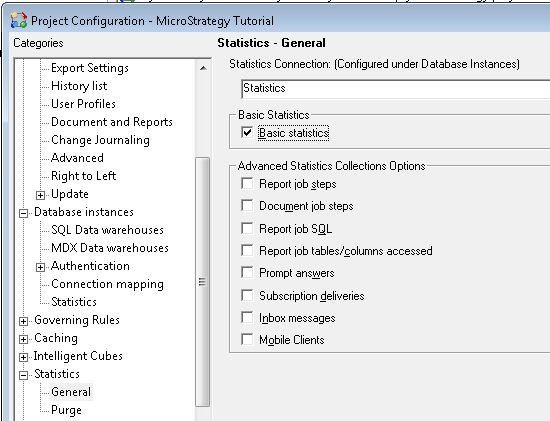
  • Check whether the statistics database is selected in the Project Configuration.
    For statistics to log correctly, at least basis statistics must be enabled for the project that the user wants to be monitored by Strategy Enterprise Manager. This can be done via Project Configuration as seen in the  image below:

ka04W00000148OMQAY_0EM440000002BDM.jpeg
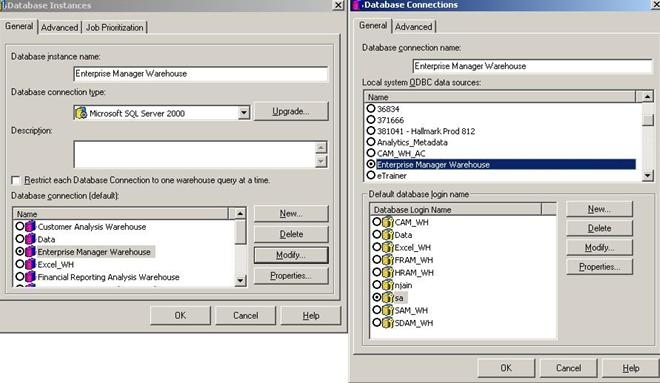
  • Check if the statistics database instance is configured correctly and is pointing to the correct DSN.
    If the ODBC Data source, Database Connection Type or Database login and password are incorrect, the project will fail to log statistics to the project for which this particular statistics database instance is selected.
     
ka04W00000148OMQAY_0EM440000002BDS.jpeg


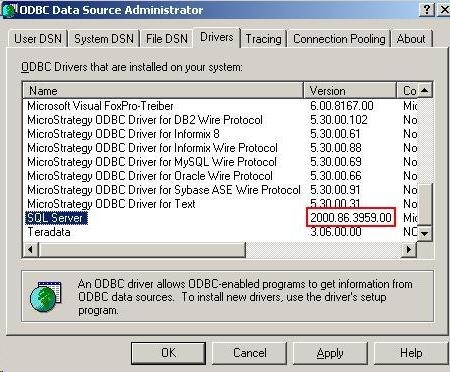
  • Check that the DSN for the statistics database instance is created using a driver that is certified to connect to Enterprise Manager warehouse.
    The statistics and Strategy Enterprise Manager warehouse database must use a driver that is certified to be used with Strategy.
     
ka04W00000148OMQAY_0EM440000002BDO.jpeg


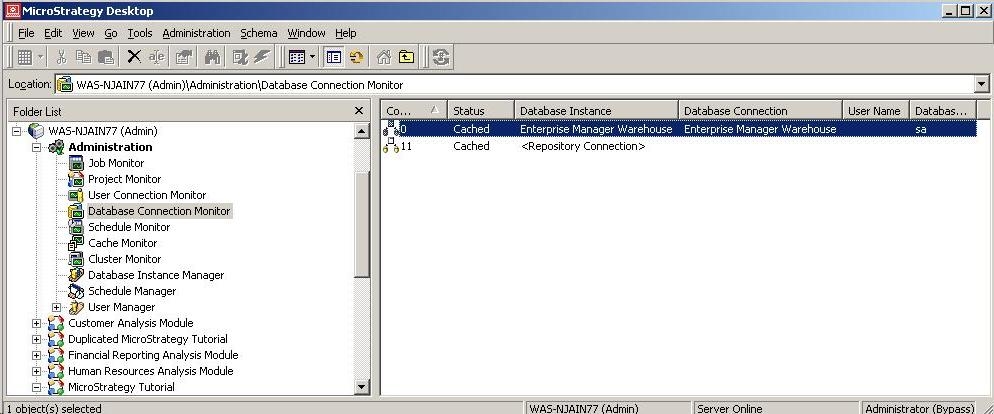
  • Check that connection to the statistics database shows in the database connection monitor, as shown below:
ka04W00000148OMQAY_0EM440000002BDQ.jpeg
  •  
    For additional details, refer to the following Strategy Knowledge Base technical note: 
    KB19579: How to troubleshoot problems with MicroStrategy Intelligence Server Statistics logging

Comment

0 comments

Details

Knowledge Article

Published:

April 6, 2017

Last Updated:

April 6, 2017