EducationSoftwareStrategy.com
StrategyCommunity

Knowledge Base

Product

Community

Knowledge Base

TopicsBrowse ArticlesDeveloper Zone

Product

Download SoftwareProduct DocumentationSecurity Hub

Education

Tutorial VideosSolution GalleryEducation courses

Community

GuidelinesGrandmastersEvents
x_social-icon_white.svglinkedin_social-icon_white.svg
Strategy logoCommunity

© Strategy Inc. All Rights Reserved.

LegalTerms of UsePrivacy Policy
  1. Home
  2. Topics

KB19829: How to convert an OLAP report to a standard report in MicroStrategy Developer 9.x and 10.x


Stefan Zepeda

Salesforce Solutions Architect • Strategy


How to convert an OLAP report to a standard report in MicroStrategy Developer 9.x and 10.x

A report changes from standard to OLAP whenever it uses view filters, derived metrics or there are objects that belong only to the Report objects window and they are not part of the template. In order to convert an OLAP report to a standard report, check the following considerations:
 

  • Make sure that there are no objects that are only part of the Report objects window. If that is the case, move them to the report template by using the Add to column, Add to row or Add to page-by options or remove them from the report.
ka02R000000kbzqQAA_0EM440000002Ehx.jpeg
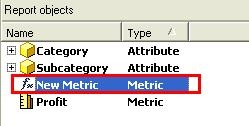
  • Make sure that derived metrics are not part of the report. In order to identify a derived metric you can check the report objects window and look for metrics with the Fx symbol as shown in the next image:
ka02R000000kbzqQAA_0EM440000002Ehz.jpeg
  • Remove any view filters that are being applied to the report by using the Clear button.
ka02R000000kbzqQAA_0EM440000002Ei7.jpeg

Note: After following the previous steps, the report must be saved in order to keep the changes and revert to Standard as shown in the following image:
 

ka02R000000kbzqQAA_0EM440000002Ei5.jpeg


Comment

0 comments

Details

Knowledge Article

Published:

June 2, 2017

Last Updated:

June 2, 2017