EducationSoftwareStrategy.com
StrategyCommunity

Knowledge Base

Product

Community

Knowledge Base

TopicsBrowse ArticlesDeveloper Zone

Product

Download SoftwareProduct DocumentationSecurity Hub

Education

Tutorial VideosSolution GalleryEducation courses

Community

GuidelinesGrandmastersEvents
x_social-icon_white.svglinkedin_social-icon_white.svg
Strategy logoCommunity

© Strategy Inc. All Rights Reserved.

LegalTerms of UsePrivacy Policy
  1. Home
  2. Topics

KB19847: Users can see projects they do not have access to in MicroStrategy Desktop 9.4.1 - Developer 10.x


Stefan Zepeda

Salesforce Solutions Architect • Strategy


This article describes an issue where users can see projects they do not have access to in MicroStrategy Desktop 9.4.1 - Developer 10.x

SYMPTOM:
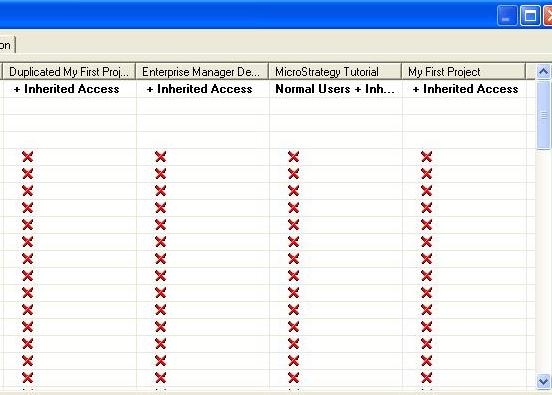
A user is created in Desktop without access to several projects.
 

ka02R000000kbUuQAI_0EM440000002EdB.jpeg

 
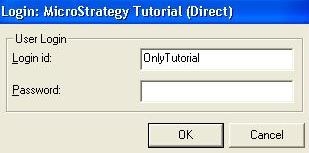
This user, Only Tutorial, has access only to the tutorial project. However, the user is able to login and see all the projects in this project source.
 

ka02R000000kbUuQAI_0EM440000002Ed9.jpeg

 
CAUSE:
The group that the user is being added to has a security role already applied to for the project that the user should not have access to.
 
In this Tutorial example the user is in the "everyone group" which has a "normal" security role for all projects.
 

ka02R000000kbUuQAI_0EM440000002EdC.jpeg

The same is true for the other projects in the project source.
 
ACTION:
To correct the issue, please do the following:

  1. 1. Open the project configuration window for those projects which need to have restricted access.
  2. 2. Scroll through the security roles until the everyone group appears.
  3. 3. Move the everyone group back to the right side.
ka02R000000kbUuQAI_0EM440000002EdA.jpeg

 
Note that all users who were in the everyone group and are no longer in a group will not have access to the project. Those users still need to be added to a security role or to a group with a security role that allows project access.


Comment

0 comments

Details

Knowledge Article

Published:

June 16, 2017

Last Updated:

June 16, 2017