By default, the Strategy SQL Engine breaks the complete report's requirements into individual SQL Passes. For the intermediate SQL passes, only the ID forms of the required attributes of the calculation (specified in the dimensionality and conditionality of the SQL pass) are selected.
Furthermore, if there is more than one attribute of the same hierarchy present in the Dimensionality/Conditionality of the SQL pass, only the ID forms of the lowest-level attribute of the hierarchy will be selected.
In this example, the Dimensionality of the Report is Region, Call Center. Call Center is a children attribute of Region:

The SQL View shows that in the Intermediate passes, only the lowest-level attribute of the hierarchy (Call Center is selected), and is until the final SQL pass where all parent ID forms are selected:
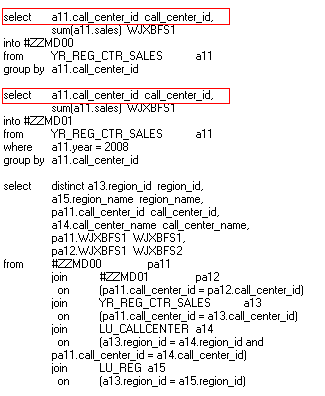
The 'Attribute Selection Option for Intermediate Pass' VLDB property allows the user to choose whether to select additional attributes (usually these parent attributes) needed on the template as the join tree and their child attributes have already been selected. In other words, if the parent attribute's ID forms are already available in the join tree; this property allows the user to select them in the intermediate SQL passes.
To access the property, from the Report editor:

The property has two options:
When the second option is selected, the SQL View now shows that the parent ID forms have been selected, since they are available in the intermediate SQL pass calculation:

