EducationSoftwareStrategy.com
StrategyCommunity

Knowledge Base

Product

Community

Knowledge Base

TopicsBrowse ArticlesDeveloper Zone

Product

Download SoftwareProduct DocumentationSecurity Hub

Education

Tutorial VideosSolution GalleryEducation courses

Community

GuidelinesGrandmastersEvents
x_social-icon_white.svglinkedin_social-icon_white.svg
Strategy logoCommunity

© Strategy Inc. All Rights Reserved.

LegalTerms of UsePrivacy Policy
  1. Home
  2. Topics

KB19902: In MicroStrategy Developer 9.x and 10.x, update schema fails with the error '[DFCSCHEMA] Population Exception: The object shown in the following hierarchy no longer exists in schema'


Stefan Zepeda

Salesforce Solutions Architect • Strategy


KB19902: In MicroStrategy Developer 9.x and 10.x, update schema fails with the error '[DFCSCHEMA] Population Exception: The object shown in the following hierarchy no longer exists in schema'

SYMPTOM:
When the user updates schema in Strategy Developer 9.x and 10.x, the following error occurs:
 
Population Exception: The object shown in the following hierarchy no longer exists in schema: - Population Exception: DBMS-DBMSThe object definition is incomplete or inconsistent.
The same error can also happen when the user executes some reports.
 
CAUSE:
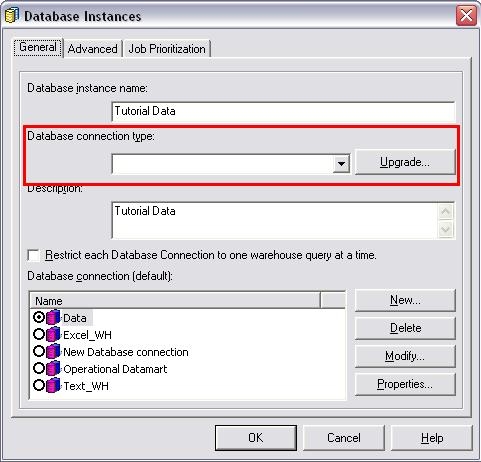
One possible cause is that one or more database instances do not have 'Database connection type as shown below:
 

ka02R000000kbieQAA_0EM440000002Eh9.jpeg

ACTION:
Check all database instances to make sure everyone has a database connection type assigned. If the user is not able to launch the Database Instance Editor or having problem re-assigning a database connection type, contact Strategy Technical Support.


Comment

0 comments

Details

Knowledge Article

Published:

June 9, 2017

Last Updated:

June 9, 2017