SUMMARY:
The issue was classified as a defect and it has been logged to Technology. This issue is limited to Strategy Visual Insight 9.4.x product only when changing attribute forms. There is a wokraround available in this document. A solution/code fix for this issue is not available in current releases but is being reviewed for a future Strategy release.
SYMPTOM:
A user may create a Visual Insight dashboard and some visualizations and later realizes the user wants to add or remove some description forms. After making modifications in the underlying report and saving it, existing Visual Insight dashboard does not reflect changes done.
STEPS TO REPRODUCE:
1. Create a report with Customer attribute and Profit metric. Make Customer First Name and Customer Last Name description forms displayed.
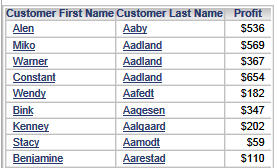
2. Create a Visual Insight dashboard using the created report as a dataset as shown below:
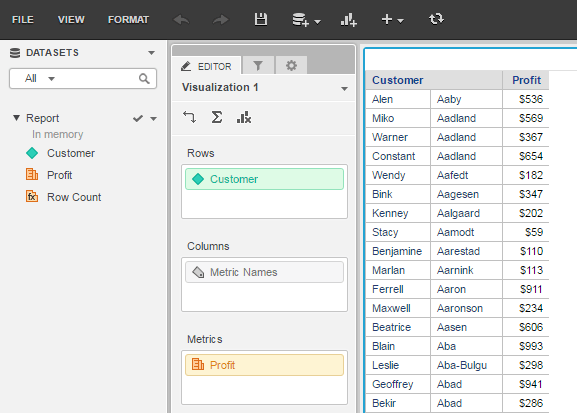
Both attribute forms displayed correctly
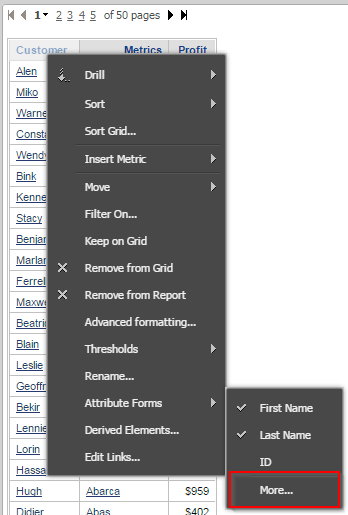
3. Open underlying report, perform right mouse click on the Customer First Name, navigate to Attribute Forms and select More…:
4. From the list of available forms select Address and move it to Selected Forms. Click OK.
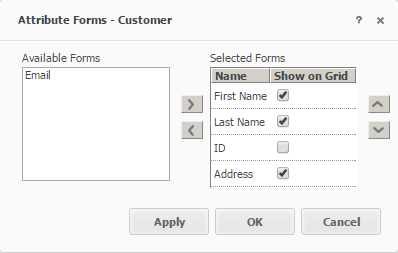
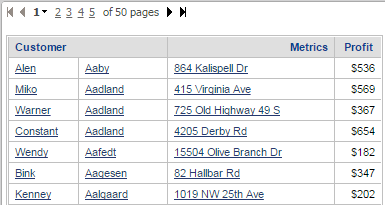
5. Click 'Apply'. The report should look like on the image below:
6. Save the report.
7. Open the existing Visual Insight document to see the issue:
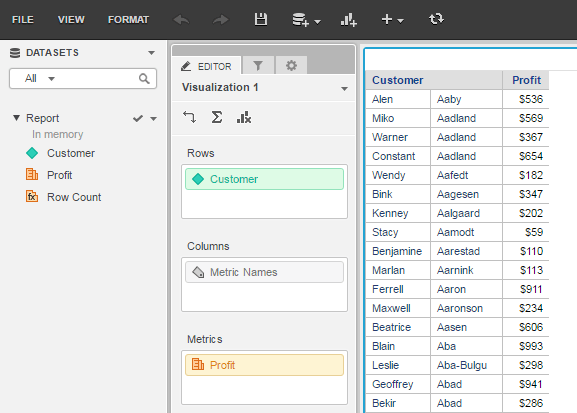
'Address' attribute form does not appear in the grid after it was added to the report as additional attribute form.
CAUSE:
The issue has been classified as a defect in Strategy Web 9.4.1 and above and only affects Visual Insight dashbaords.
ACTION:
This is a known limitation of the Strategy product and has not been scoped for a future release in the near term. Strategy will continue to investigate and post updates as soon as they are available.
WORKAROUND:
- Create a new Visual Insight dashboard based on the modified attribute form report.
ADDITIONAL TROUBLESHOOTING:
If the steps above do not resolve the issue, please consider calling Strategy tech support with the following information of troubleshooting already done:
TO LEARN MORE:
For information about Visual Insight and its functionalities, refer to the Strategy Dashboards and Widgets Creation Guide.
