EducationSoftwareStrategy.com
StrategyCommunity

Knowledge Base

Product

Community

Knowledge Base

TopicsBrowse ArticlesDeveloper Zone

Product

Download SoftwareProduct DocumentationSecurity Hub

Education

Tutorial VideosSolution GalleryEducation courses

Community

GuidelinesGrandmastersEvents
x_social-icon_white.svglinkedin_social-icon_white.svg
Strategy logoCommunity

© Strategy Inc. All Rights Reserved.

LegalTerms of UsePrivacy Policy
  1. Home
  2. Topics

KB19912: ‘Error in report results’ error message obtained when clicking on a copy of the Blank Report template or any other template that does not open directly in Design Mode in MicroStrategy Web 9.x


Community Admin

• Strategy


This article explains why ‘Error in report results’ error message obtained when clicking on a copy of the Blank Report template or any other template that does not open directly in Design Mode in MicroStrategy Web 9.x

SYMPTOM:
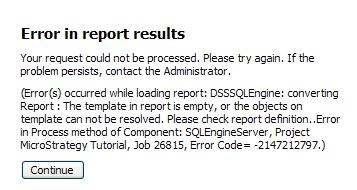
Users receive the following error message when opening a copy of the Blank report template or any other user created template that does not open directly in Design Mode in Strategy Web 9.x
ka04W000000OgYOQA0_0EM4400000028TR.jpeg

Error in report results
Your request could not be processed. Please try again. If the problem persists, contact the Administrator.
(Error(s) occurred while loading report: DSSSQLEngine: converting Report : The template in report is empty, or the objects on template can not be resolved. Please check report definition..Error in Process method of Component: SQLEngineServer, Project Strategy Tutorial, Job 26815, Error Code= -2147212797.)
STEPS TO REPRODUCE:
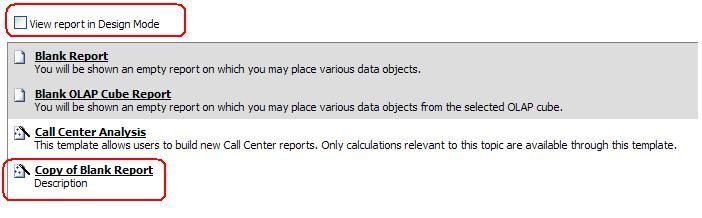
  • Create a copy of the Blank Report template in MSTR Developer
  • Log into Web and click on Create Report link
  • Uncheck the option that says `View report in Design Mode`:
ka04W000000OgYOQA0_0EM4400000028TO.jpeg
  • Click on the copy of the blank report template to generate the error

CAUSE:
The error message is not reproduced if the original Blank Report template is clicked. This is because the default template is associated with a predefined GUID, so even when the option to open in design mode is unchecked, it automatically opens the template in the design mode. Strategy Web senses that it has nothing on the template, and thus errors out.
ACTION:
Use original Blank Report template instead of using a copy of it to resolve the issue.


Comment

0 comments

Details

Knowledge Article

Published:

June 14, 2017

Last Updated:

June 14, 2017