EducationSoftwareStrategy.com
StrategyCommunity

Knowledge Base

Product

Community

Knowledge Base

TopicsBrowse ArticlesDeveloper Zone

Product

Download SoftwareProduct DocumentationSecurity Hub

Education

Tutorial VideosSolution GalleryEducation courses

Community

GuidelinesGrandmastersEvents
x_social-icon_white.svglinkedin_social-icon_white.svg
Strategy logoCommunity

© Strategy Inc. All Rights Reserved.

LegalTerms of UsePrivacy Policy
  1. Home
  2. Topics

KB199346: Enterprise Manager reports and documents timeout in 3-tier, but the same reports execute successfully in 2-tier in MicroStrategy 9.3.1 and newer releases


Community Admin

• Strategy


Users may see the following error when executing an Enterprise Manager report or document in 3-tier in MicroStrategy 9.3.1 and newer releases. Error: SQL Generation Complete The job execution time limit set in MicroStrategy Intelligence Server has been exceeded for job ###: at (###). The job was cancelled.

SYMPTOM
Users may see the following error when executing an Enterprise Manager report or document in 3-tier in Strategy 9.3.1 and newer releases.


Error: SQL Generation Complete The job execution time limit set in Strategy Intelligence Server has been exceeded for job ###: at (###). The job was cancelled.
The same reports execute successfully in 2-tier. Additionally, users are unable to browse attribute elements in Data Explorer in 3-tier.
 
CAUSE
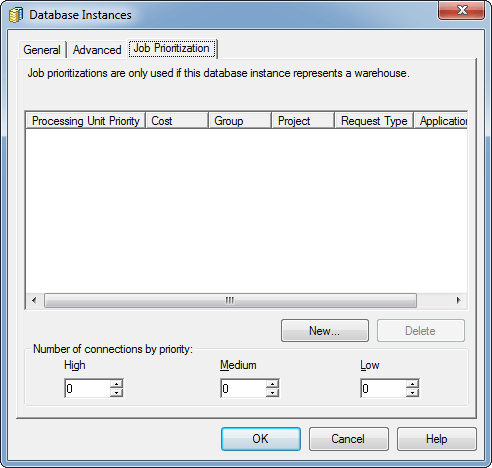
One possible cause for this issue is that the default Statistics database instance is set as the default database instance for the Enterprise Manager project. The default Statistics database instance has 0 set for all job prioritization levels (High, Medium and Low) as shown below.
 

ka04W000000ObPhQAK_0EM4400000029Lo.jpeg

 
Since job prioritizations do not affect 2-tier connections, the issue is not seen in 2-tier. The timeout setting is due to the “Interactive reports” governing limit at the project level.
 
ACTION
The user can either modify the job prioritization settings of the default Statistics database instance OR the user can create a new database instance to the Statistics repository, which will have 2 connections set for each job priority.


Comment

0 comments

Details

Knowledge Article

Published:

June 2, 2017

Last Updated:

June 2, 2017