Explanation of high export times to Excel when lots of formatting, thresholds, and page-by elements with Reports versus Report Services Documents in Strategy 9.4.x.
A scenario may exist in which a high volume of data needs to be exported to Excel with very specific and intense formatting applied to the report, some of which may include thresholds. Additionally, multiple objects exist in the Page-By section of the report, and those page-by element combinations are desired to be exported as separate worksheet pages in Excel. The scenario may result in undesired export times, and perhaps what appears to be exceedingly high and unnecessary export times.
This scenario can be explained, and worked around by understanding the workflows for how a Report object exports utilizing intense thresholds, formatting, and page-by elements. This is detailed below:
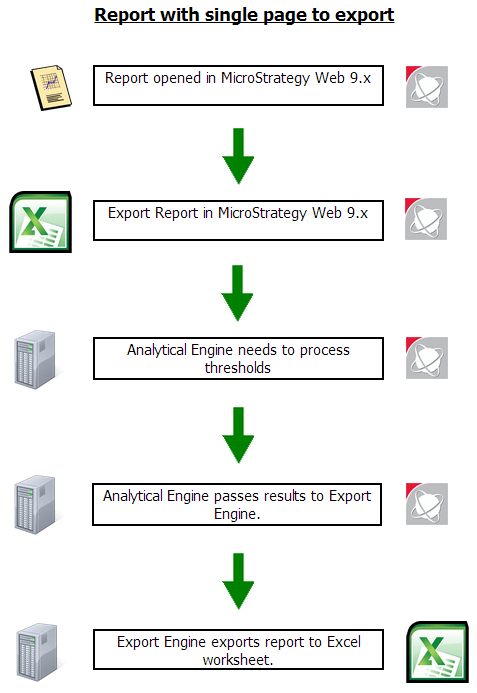
If a report with multiple sheets is exported, the workflow should be like this:
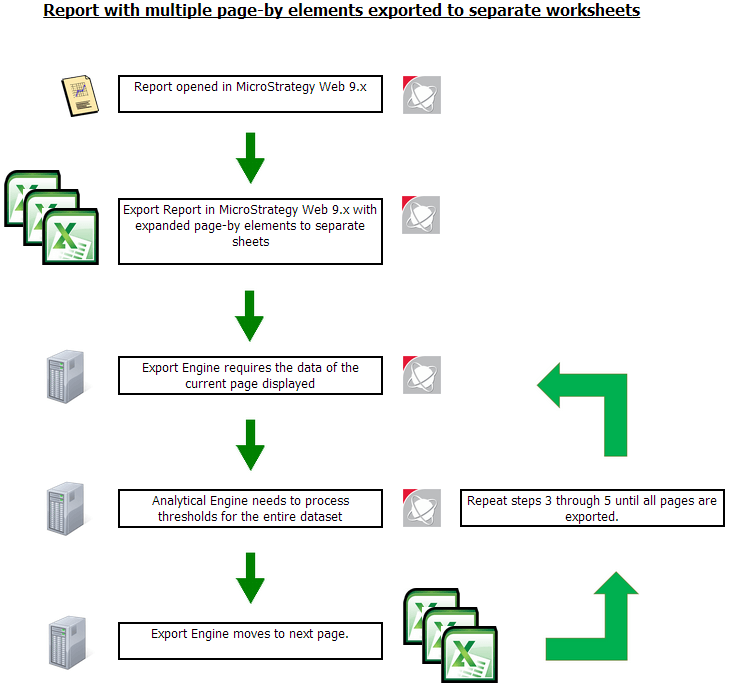
Yes, the Analytical Engine needs to re-calculate the thresholds for the whole dataset again and again due to the threshold workflow design. That is why one can see exceedingly high export times when exporting a report with tons of thresholds, formatting, and/or page-by elements to expand to separate worksheets. This is by design based on the Threshold workflow for Reports (more on that below).
For a Report Services Document, the workflow of exporting such cases is shown as below:
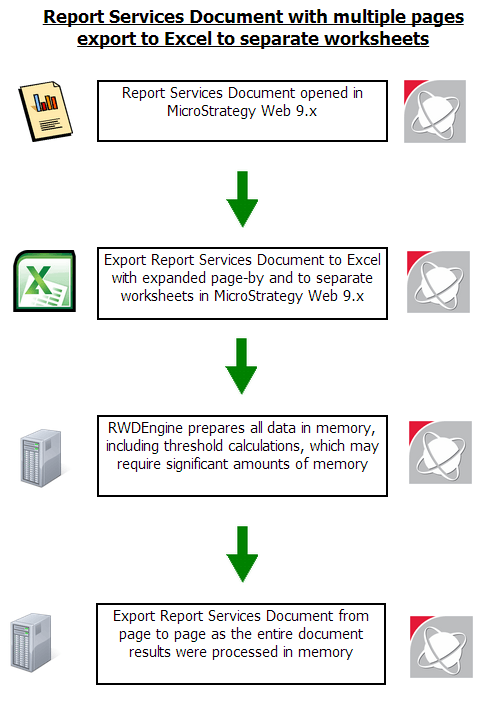
This means we can export a Report Services Document without recalculating the thresholds and formatting. That’s why a Report object that takes exceedingly high amounts of time to export can be converted to a Report Services Document, and the export time drops significantly. This can essentially act as a workaround in some scenarios based on the differences between workflow between a Report and a Report Services Document, but may consume significant amounts of memory in exchange for lower export times.
More analysis on the workflows:
It is important to understand that “Report” and “Document” are totally different objects. Each has their own structure.
In addition, “Page-by” is a concept only for reports, and “Normal Group-by (NGB)” is a concept for Report Services Documents. When we execute a report with “Page-by”, the report should have 3 axis (row, column and “Page-by” element). On the other hand, “NGB” is only a section in document’s tree structure, and is different from "Page-by".
Furthermore, the export engine fetches data from a report instance or document instance which would be generated by the Analytical Engine.
In an example scenario, an export of a report with multiple sheets with intense threshold formatting and page-by elements, only the data of current page is formatted and seen in Grid View. This is why workflow of exporting report with page-by is as described previously -- each page has to be calculated separately because only one can be viewed in a report. As a result, the Analytical Engine recalculates the thresholds for the entire dataset because each page needs to have the proper formatting based on the conditions defined in the thresholds for each object. This leads to exceedingly high export times in some scenarios.
