EducationSoftwareStrategy.com
StrategyCommunity

Knowledge Base

Product

Community

Knowledge Base

TopicsBrowse ArticlesDeveloper Zone

Product

Download SoftwareProduct DocumentationSecurity Hub

Education

Tutorial VideosSolution GalleryEducation courses

Community

GuidelinesGrandmastersEvents
x_social-icon_white.svglinkedin_social-icon_white.svg
Strategy logoCommunity

© Strategy Inc. All Rights Reserved.

LegalTerms of UsePrivacy Policy
  1. Home
  2. Topics

KB19957: When using ASCII code to display the ‘Registered’ ® or ‘Copyright’ © characters in MicroStrategy Web 9.4.1 and 10.x for a Report Services Document, the ASCII code and is displayed in PDF view.


Community Admin

• Strategy


When using ASCII code to display the ‘Registered’ ® or ‘Copyright’ © characters in MicroStrategy Web 9.4.1 and 10.x for a Report Services Document, the ASCII code and is displayed in PDF view.

SYMPTOM:
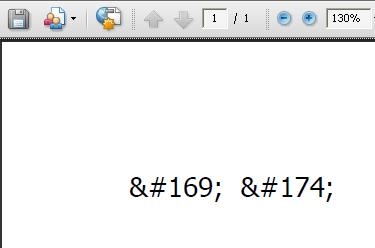
When the use of special characters is necessary such as the 'Registered' character ® or the 'Copyright' character © in a Report Services Document in Strategy Web  and the user wishes to use the ASCII code to display it(i.e. © for © or ® for ®), the correct characters are not displayed when viewing the document in PDF view as shown below:
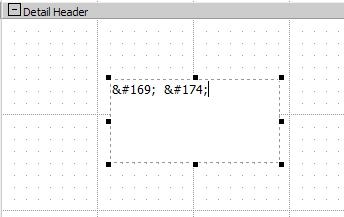
 

ka04W000000Ock2QAC_0EM4400000028SC.jpeg


ka04W000000Ock2QAC_0EM4400000028S9.jpeg

 
CAUSE:
This happens because in Strategy Web 8.x the browser can interpret the ASCII code for display purposes; however, when exporting and viewing the Report Services Document in PDF format, Acrobat does not interpret the ASCII code and display it as the code itself instead of the corresponding character.
 
ACTION:
In order to be able to view the characters successfully, the user must insert the character from another source as an image (i.e Microsoft Word) or use a URL for the image reference as so:
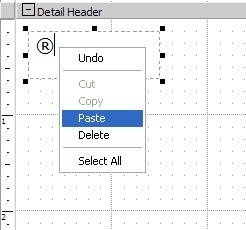
 

ka04W000000Ock2QAC_0EM4400000028SB.jpeg

Comment

0 comments

Details

Knowledge Article

Published:

July 11, 2017

Last Updated:

July 11, 2017