SUMMARY:
The issue occurs due to a conflict between Strategy Web and the Intelligence Server by new feature introduced in 9.4.x. It is recommended to have Web Server and I-Server on the same version. This issue impacts all documents that have multiple datasets in Web. There are two workarounds available.
SYMPTOM:
In the situation when the I-Server is on 9.4.x version but Strategy Web server is on 9.3.x, the following error occurs when a user attempts to run a document with multiple datasets or add a second dataset to an existing document:

Based on the product ReadMe, Compatibility and Interoperability section, the issue should not occur because "Strategy Analytics Enterprise is interoperable with Strategy 9.4, 9.3.1, 9.3.0, 9.2.1m, 9.2.1, 9.2.0, and 9.0.2 products":

For more information on Compatibility and Interoperability, refer to KB45065: MicroStrategy Analytics 9.4.1 Product Suite Readmes and Release Notes and click on “Strategy Analytics Enterprise General Information" link then select "Compatibility and Interoperability" tab.
STEPS TO REPRODUCE:
There are 2 ways to reproduce the issue.
Method #1:
- Create a document with 2 or more datasets in Strategy pre-9.4.0 version.
- Upgrade I-Server to 9.4.0 or newer.
- Run the document to see the issue
Method # 2:
- If a user has 2 environments, 9.3.x or older and 9.4.x:
- Connect 9.3.x Strategy Web server to 9.4.x I-Server on Web Administrator page by typing server name in the following text box:
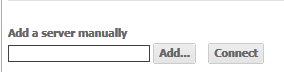
- On the project page, find the one that is connected to 9.4.x I-Server (in case the Strategy Web Server is connected to several I-Servers):

- Run a document that contains several datasets or create a new document and attempt to add two datasets to reproduce the issue.
CAUSE:
The issue is caused by a new join behavior of datasets introduced in 9.4. Starting from Strategy Analytics Enterprise 9.4, Report Services documents can contain grids with objects coming from more than one dataset. This feature is documented in the following Strategy Knowledge Base document:
KB44944: Multiple datasets in a single grid/graph/widget object in Strategy Web 9.4
This feature is controlled by the VLDB setting "Allow objects in document grids to come from multiple datasets" that is enabled by default. When a user upgrades I-Server to 9.4.x version but MicroStrtategyWeb server is still on pre-9.4 version, the conflict is created that causes the error.
ACTION / WORKAROUND:
Note: Strategy recommends having Strategy Web server and I-Server always on the same version. Interoperable does not equal supported or certified and if any problems arise from this configuration that do not occur if both servers are in the same version then the solution will be to upgrade.
ADDITIONAL TROUBLESHOOTING:
If the steps above do not resolve the issue, please consider calling Strategy Technical Support with the following information of troubleshooting already done:
TO LEARN MORE:
KB45065: MicroStrategy Analytics 9.4.1 Product Suite Readmes and Release Notes.
Section "Compatibility and Interoperability".
KB44944: Multiple datasets in a single grid/graph/widget object in MicroStrategy Web 9.4
