EducationSoftwareStrategy.com
StrategyCommunity

Knowledge Base

Product

Community

Knowledge Base

TopicsBrowse ArticlesDeveloper Zone

Product

Download SoftwareProduct DocumentationSecurity Hub

Education

Tutorial VideosSolution GalleryEducation courses

Community

GuidelinesGrandmastersEvents
x_social-icon_white.svglinkedin_social-icon_white.svg
Strategy logoCommunity

© Strategy Inc. All Rights Reserved.

LegalTerms of UsePrivacy Policy
  1. Home
  2. Topics

KB199606: A user receives the error "405 - HTTP verb used to access this page is not allowed" when attempts to open PDF ( or docx) file using a hyperlink in MicroStrategy Web


Community Admin

• Strategy


This technical note describes an issue in MicroStrategy Web where a user receives the error "405 - HTTP verb used to access this page is not allowed." The impact is limited to MicroStrategy Web 9.4.1 Hotfix 4 product only with documents using hyperlinks ./images/name.pdf (./images/name.docx) to open PDF (or Word) documentsThis issue has been addressed in MicroStrategy 9.4.1 Hotfix 5. Upgrade to take advantage of this fix.

SYMPTOM:  
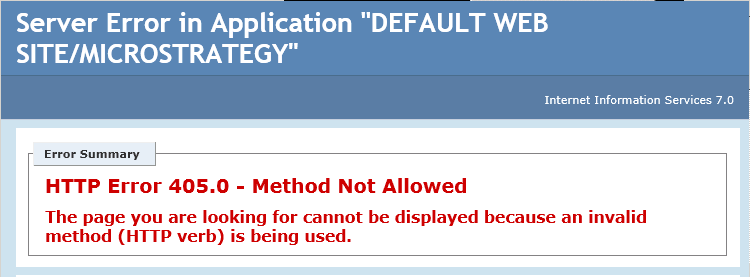
In Strategy Web 9.4.1 Hotfix 4, when a user uses a hyperlink to open a document in PDF or Word format, the following error appears after attempting to click on the link: 
ka04W00000148HAQAY_0EM4400000025yQ.jpeg


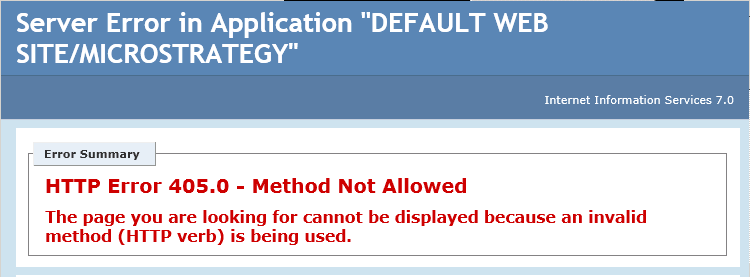
HTTP Error 405.0 - Method Not Allowed.The page you are looking for cannot be displayed because an invalid method (HTTP verb) is being used.

 
STEPS TO REPRODUCE:

  1. Select any PDF file and save it in the Image folder in the  following locations:
  • Default location on  the Web Server:  C:\Program Files (x86)\Strategy\Web ASPx\Images 
  • Default location for i-Server: C:\Program Files (x86)\Strategy\Intelligence Server\Images
  • C:\Program Files (x86)\Common Files\Strategy\images

To demonstrate the issue, Dynamic Dashboard manual was selected with the file name DYNDASH.pdf
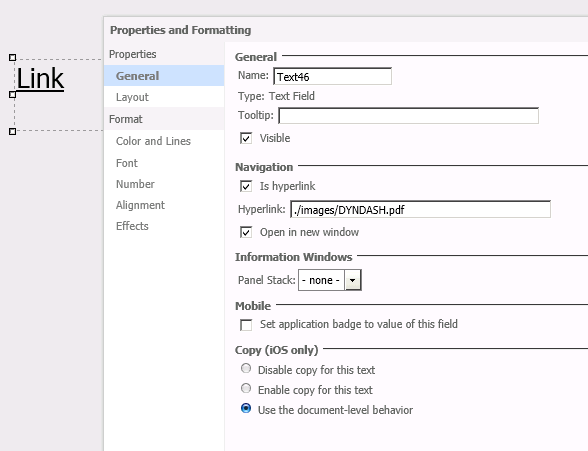
  1. Create a Report Services Document, place a text box and name it as a Link
  2. Open Properties and Formatting of the textbox and specify the location for the PDF file under "Is Hyperlink" as shown below:


ka04W00000148HAQAY_0EM4400000025yT.jpeg


  1. Run the document in any mode and click on the link to reproduce the issue:
ka04W00000148HAQAY_0EM4400000025yN.jpeg

CAUSE:
This has been classified as a defect in Strategy Web 9.4.1 Hotfix 4 specifically affecting documents with hyperlinks.
ACTION:
This issue has been addressed in Strategy 9.4.1 HotFix 5. Apply the hotfix to resolve the issue
WORKAROUND:
The PDF or Word file can be opened by following the instructions below:
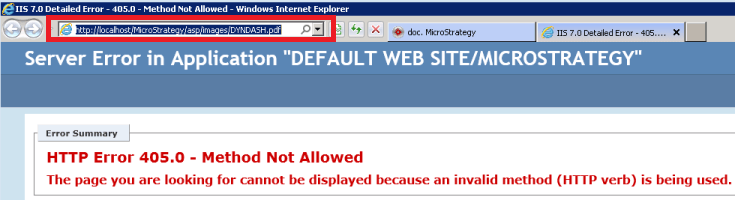
  • Highlight the address (URL) in the address bar in a browser 


ka04W00000148HAQAY_0EM4400000025yL.jpeg
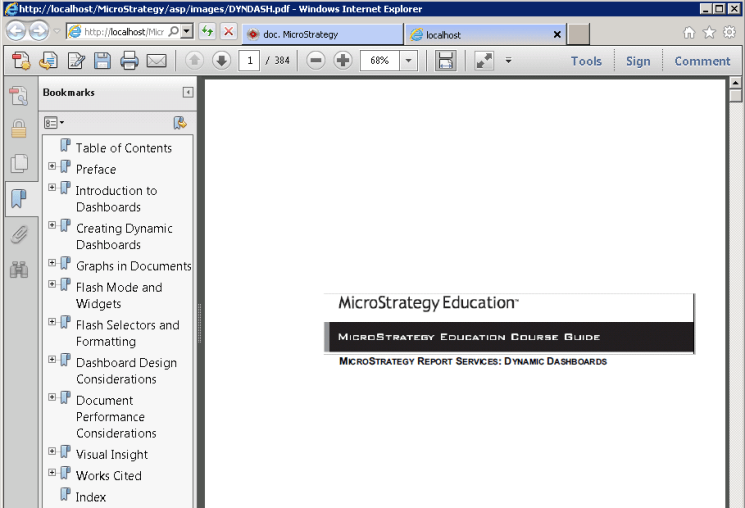
  • Click on Enter, the PDF file gets displayed as shown below:


ka04W00000148HAQAY_0EM4400000025yJ.jpeg

 
ADDITIONAL TROUBLESHOOTING:
If the steps above do not resolve the issue, please consider calling Strategy Technical Support  with the following information of troubleshooting already done:

  • Results of testing the workaround, details on behavior after reentering the URL in a browser.
  • Results or output of following the above Action steps. Does the same error occur?

 
TO LEARN MORE:
Related technotes:
KB41559: Users are unable to open a PDF document using relative path in MicroStrategy Mobile 9.2.1m
KB41282: An error happens when viewing a PDF using Windows authentication on iPad in MicroStrategy Mobile 9.2.1m
KB34122: In MicroStrategy Web 9.0.x, links in Report Services Documents in PDF View do not open in a new browser window even if the option `Open in New Window` is checked


Comment

0 comments

Details

Knowledge Article

Published:

June 8, 2017

Last Updated:

June 8, 2017