EducationSoftwareStrategy.com
StrategyCommunity

Knowledge Base

Product

Community

Knowledge Base

TopicsBrowse ArticlesDeveloper Zone

Product

Download SoftwareProduct DocumentationSecurity Hub

Education

Tutorial VideosSolution GalleryEducation courses

Community

GuidelinesGrandmastersEvents
x_social-icon_white.svglinkedin_social-icon_white.svg
Strategy logoCommunity

© Strategy Inc. All Rights Reserved.

LegalTerms of UsePrivacy Policy
  1. Home
  2. Topics

KB199960 : How to log out from MicroStrategy Mobile Application for iOS in 9.4.1 Hotfix 3 and later


Community Admin

• Strategy


This document shows how to log out of MicroStrategy Mobile application without having to force close the app on iOS in 9.4.1 Hotfix 3 and later.

Question

 Is it possible to log out of Strategy Mobile application without having to force close the app on iOS?

Answer

Starting in 9.4.1 HF 3, a new option in the Mobile Server has been added to allow a Strategy Mobile user to log out of the application without having to force close the app on the iPad.
To take advantage of this feature, follow the next steps:
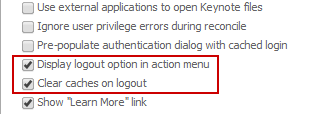
  • On the Mobile Server, when creating a new mobile configuration check the option "Display logout option in action menu" and "Clear caches on logout" (Strongly suggested if the device will be used by different users)

ka04W000000OfwBQAS_0EM440000002A34.jpeg
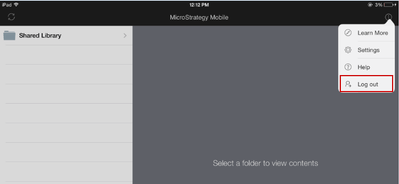
  • Reload the configuration on the device and once in the application is configured in the action menu, the logout option will be displayed.

ka04W000000OfwBQAS_0EM440000002A35.jpeg

Considerations:

  • If the configuration is using a landing page, the logout option won't be available on the iPad action menu, however the same functionality can be achieved by using the Mobile URL API event mstr://?evt=4000

Comment

0 comments

Details

Knowledge Article

Published:

April 3, 2017

Last Updated:

July 17, 2017