Intelligence Server first looks for elements on the Client machine's element cache and then on the Intelligence Server's element cache and then goes to the warehouse database to fetch attribute elements.
For more information on how element caching works, refer to the following knowledge base document:
KB19581: Element browsing and caching in the Strategy Intelligence Server in 9.x and 10.x
When users run into errors while loading prompts or browsing on data explorer, it is useful to understand if the error is being received only when trying to fetch attribute elements from the warehouse database or if the error is being encountered only when retrieving the elements from element cache. If users can confirm that errors are being received only when retrieving elements from the warehouse database, then factors such as network connection, database server issues etc. can be looked into.
However, from the interface it is not possible to tell if elements are being retrieved from cache or from the warehouse. This information can be obtained by enabling the Element Server > Element Source trace. This trace can be enabled under 'CastorServer Instance' for 3-tier attribute element requests or under 'Machine Default' for 2-tier element requests.
To enable this tracing and log information to a file, the following steps need to be implemented:
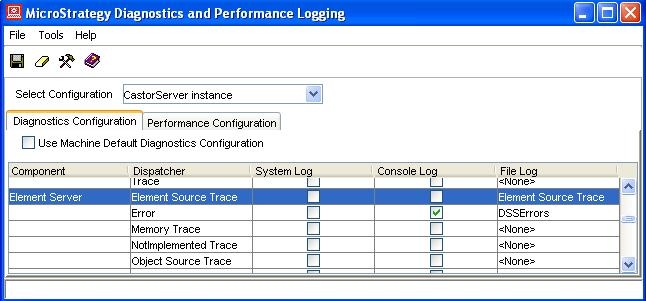
Logs similar to the following are recorded in the Element Source Trace. The trace shows the object for which elements are being retrieved and if elements are found in cache or not (as highlighted below).
4012: 2008-12-03 16:31:31.584-05:00 Getting elements for Object(Name="Year" Type=Attribute ID=8D679D5111D3E4981000E787EC6DE8A4 Proj=FEC0B07E49ED148E42B0789CF5C4C887 Ver=4795A7214FBE34774FCBB7943337AFF7 ) (Offset=1 Limit=1000) without creating a report for them
4012: 2008-12-03 16:31:31.584-05:00 Elements not in cache
If elements are not found in cache, internally a Strategy report job is created to retrieve the attribute elements. This step is shown in the logs below:
4012: 2008-12-03 16:31:31.584-05:00 Getting elements for Object(Name="Year" Type=Attribute ID=8D679D5111D3E4981000E787EC6DE8A4 Proj=FEC0B07E49ED148E42B0789CF5C4C887 Ver=4795A7214FBE34774FCBB7943337AFF7 ) (Offset=1 Limit=1000) by creating a report for them if not in cache
The following logs show elements being retrieved from the warehouse and elements being cached in the element cache.
4012: 2008-12-03 16:31:31.724-05:00 Getting elements for Object(Name="Year" Type=Attribute ID=8D679D5111D3E4981000E787EC6DE8A4 Proj=FEC0B07E49ED148E42B0789CF5C4C887 Ver=4795A7214FBE34774FCBB7943337AFF7 ) from ReportInstance(Name="-" ExecFlags=0x8(ElmtBrw ) ExecActn=0x8(Alrt ) ) (Offset=1 Limit=1000)
4012: 2008-12-03 16:31:31.724-05:00 Populated elements from ReportInstance(Name="-" ExecFlags=0x8(ElmtBrw ) ExecActn=0x8(Alrt ) ) (ElSrvOffset=1 ElSrvLimit=1000 Total=4)
4012: 2008-12-03 16:31:31.724-05:00 Cached Elements(Count(Element)=4 Limit=1000 Offset=1 #1=Element(Count(Text/FormID)=1 #1="2005"/0 Attribute="Year"/8D679D5111D3E4981000E787EC6DE8A4) #2=Element(Count(Text/FormID)=1 #1="2006"/0 Attribute="Year"/8D679D5111D3E4981000E787EC6DE8A4) #3=Element(Count(Text/FormID)=1 #1="2007"/0 Attribute="Year"/8D679D5111D3E4981000E787EC6DE8A4) )
If elements are retrieved from cache, logs similar to the following are seen in this trace:
4012: 2008-12-03 16:37:54.032-05:00 Getting elements for Object(Name="Year" Type=Attribute ID=8D679D5111D3E4981000E787EC6DE8A4 Proj=FEC0B07E49ED148E42B0789CF5C4C887 Ver=4795A7214FBE34774FCBB7943337AFF7 ) (Offset=1 Limit=1000) without creating a report for them
4012: 2008-12-03 16:37:54.032-05:00 Found in cache: Elements(Count(Element)=4 Limit=1000 Offset=1 #1=Element(Count(Text/FormID)=1 #1="2005"/0 Attribute="Year"/8D679D5111D3E4981000E787EC6DE8A4) #2=Element(Count(Text/FormID)=1 #1="2006"/0 Attribute="Year"/8D679D5111D3E4981000E787EC6DE8A4) #3=Element(Count(Text/FormID)=1 #1="2007"/0 Attribute="Year"/8D679D5111D3E4981000E787EC6DE8A4) )
