EducationSoftwareStrategy.com
StrategyCommunity

Knowledge Base

Product

Community

Knowledge Base

TopicsBrowse ArticlesDeveloper Zone

Product

Download SoftwareProduct DocumentationSecurity Hub

Education

Tutorial VideosSolution GalleryEducation courses

Community

GuidelinesGrandmastersEvents
x_social-icon_white.svglinkedin_social-icon_white.svg
Strategy logoCommunity

© Strategy Inc. All Rights Reserved.

LegalTerms of UsePrivacy Policy
  1. Home
  2. Topics

KB20003: ‘Error transmitting to [xxxx] - 85005:Invalid parameters. Possible cause: No valid recipient e-mail addresses. at host << No IP address information available. >>’ is reported in the DELogs when running a service in MicroStrategy Narrowcast Server


Community Admin

• Strategy


SYMPTOM:
Service with static subscription set fails in Strategy Narrowcast Server 8.x and the following error is reported in the DELogs:
 

:5752:Service ID Execution ID Segment ID Error transmitting to recipient - 85005:Invalid parameters. Possible cause: No valid recipient e-mail addresses. at host << No IP address information available. >>

 
CAUSE:
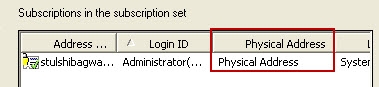
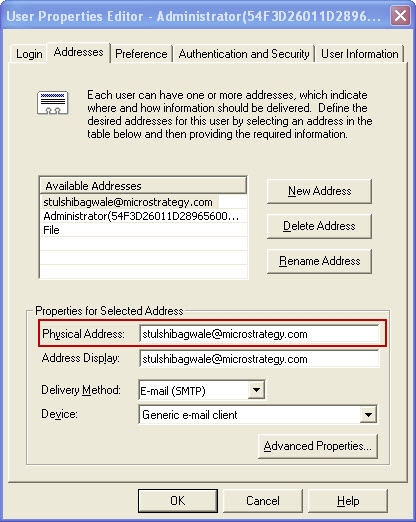
An invalid address is specified for the subscriber(s) who are part of the static subscription set for the service. The delivery address is specified in the Physical Address field on the Addresses tab in the User Properties Editor. This error is received if this delivery address is an invalid one, as shown:
 

ka04W000000OgoYQAS_0EM440000002BC2.jpeg

 
ACTION:
Correct the invalid address for the subscriber(s) in the static subscription set. This can be done as follows:
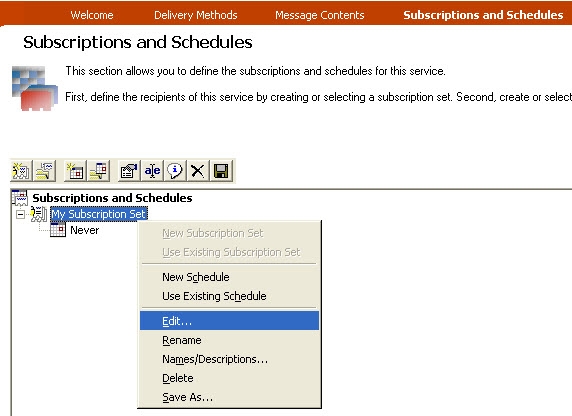
 

  • Edit the service using the Service Wizard.
  • Go to the Subscriptions and Schedules tab and edit the subscription set.
ka04W000000OgoYQAS_0EM440000002BCB.jpeg
  • Determine which subscription(s) has an invalid address in the Physical Address column.
ka04W000000OgoYQAS_0EM440000002BC4.jpeg
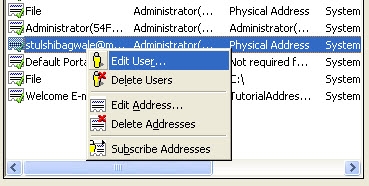
  • Edit the user to whom the address belongs to.
ka04W000000OgoYQAS_0EM440000002BC9.jpeg
  • In the Addresses tab for that user, insert the correct address in the Physical Address field.
ka04W000000OgoYQAS_0EM440000002BC1.jpeg
  • Click OK, Save and Close the subscription set and Finish the Service Wizard.

Comment

0 comments

Details

Knowledge Article

Published:

June 8, 2017

Last Updated:

June 8, 2017