EducationSoftwareStrategy.com
StrategyCommunity

Knowledge Base

Product

Community

Knowledge Base

TopicsBrowse ArticlesDeveloper Zone

Product

Download SoftwareProduct DocumentationSecurity Hub

Education

Tutorial VideosSolution GalleryEducation courses

Community

GuidelinesGrandmastersEvents
x_social-icon_white.svglinkedin_social-icon_white.svg
Strategy logoCommunity

© Strategy Inc. All Rights Reserved.

LegalTerms of UsePrivacy Policy
  1. Home
  2. Topics

KB20012: When exporting a Report Services Document that contains a grid inside of a Panel Stack, the output results differ when compared between a PDF and Excel export in MicroStrategy Web 9.0.0


Community Admin

• Strategy


This technical note article describes why a grid information would clip after exporting to PDF or excel if it's inside a panel stack in MicroStrategy Web 9.0.0.

SYMPTOM:
When exporting a Report Services Document to PDF and Excel from Strategy Web 9.0.0 that contains a Grid embedded where its output overflows the Panel Stack size, the output of these two files are not the same.
STEPS TO REPRODUCE:
Using the Strategy Tutorial, perform the following actions:
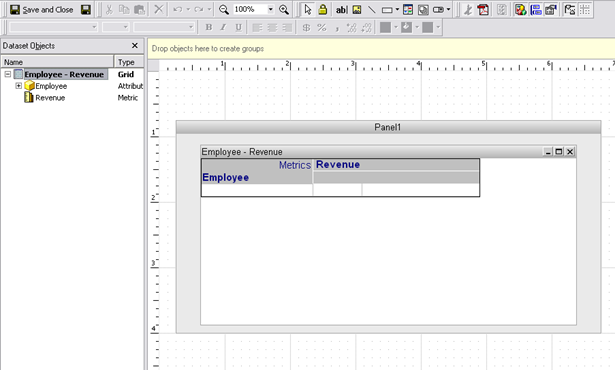
  • Create a report that contains the Employee attribute in the rows and the Revenue metric in the columns. Save and close as R1.
  • Create a new Report Services Document using the Dashboard template and choose the report created above for the dataset.
  • Insert a new Panel Stack and add the dataset to it as shown in the image below.
ka04W000000OhNhQAK_0EM4400000028S7.jpeg
  • Export the Report Services Document to PDF and the data will be cut off as shown in the image below:
ka04W000000OhNhQAK_0EM4400000028S8.jpeg
  • Now export the same Document to Excel and all of the data for the grid will be displayed as shown in the image below:
ka04W000000OhNhQAK_0EM4400000028SA.jpeg

CAUSE:
This is a known issue in Strategy Web 9.0.0.
 
ACTION:
This issue has been addressed with Strategy 9.0.1 with the introduction of a new Panel Stack preference called: 'Clip contents of Panel Stack when exporting'. Upgrade to this version or newer to take advantage of the fix.
By default, this setting is enabled. It can be disabled if needed, by accessing the Panel Stack preferences > Advanced > Export, like shown below.

ka04W000000OhNhQAK_0EM4400000028S6.jpeg


Comment

0 comments

Details

Knowledge Article

Published:

May 23, 2017

Last Updated:

May 23, 2017